In the world of industrial automation, Delta Electronics is a name you’ll come across quite often. Among their wide range of automation tools, ISPSoft stands out as one of the most popular and beginner-friendly PLC programming platforms. In this post, we’ll guide you through what ISPSoft is, the devices it supports, and how you can install it on your system.
What is ISPSoft?
ISPSoft is Delta’s official software platform used to program:
- PLCs (like AH, AS, and DVP series)
- HMIs (TP04P, TP70P series)
- VFDs (VFD-E, C200, C2000, C2000 Plus, CH2000, CT2000, CP2000/CFP2000, MS300, MH300, MPD series)
ISPsoft complies with the IEC 61131-3 standard, allowing you to write logic in multiple programming languages such as:
- Ladder Diagram (LD)
- Function Block Diagram (FBD)
- Structured Text (ST)
- Instruction List (IL)
- Sequential Function Chart (SFC)
One of the best features of ISPSoft is its built-in simulation mode – you can test your PLC logic without needing the physical hardware. Additionally, the software supports VFD parameter configuration and live monitoring, making it a versatile tool not just for logic development but also for drive control and diagnostics.
Installation and System Requirements
The latest version, ISPSoft V3.21, was released on April 21, 2025. It supports a wide range of Windows operating systems:
- Windows 7
- Windows 8
- Windows 10
- Windows 11
The download size is around 1.55 GB, which is relatively lightweight for such a feature-rich application. Installation is straightforward and user-friendly, making it ideal for students, beginners, and professionals alike.
To communicate with Delta’s hardware (PLCs, VFDs, etc.), you’ll also need to install COMMGR – Delta’s communication manager software. This must be installed separately for proper device interfacing.
Free Download ISPSoft Software
Open Google Chrome and Search for “Deltaww”. Next, open the Delta Electronics website as shown in the image below. Then go to the Downloads section. Search for “ISPSoft” software

Or, download the ISPSoft software from the link below directly.
Here, you need to check for the latest version – ISPSoft V3.21. Once you click the link, it will start downloading on your PC.
Important Note:
Always download ISPSoft only from the official Delta Electronics website to ensure software authenticity and avoid security risks. Make sure your PC is protected with a reliable antivirus program.
In some cases, antivirus software may flag or block the download or installation process. If you’re certain the installer is from the official Delta source, you can temporarily disable the antivirus for installation. Reactivate it immediately after the process is complete to maintain your system’s protection.
Once downloaded, you then need to start installing the software. When you start the installation, you will first see the window below welcoming you to the installation process. Here, you have to click the install button.

This will start the installation process. If your PC does not have Microsoft Visual C++ 2013 Redistributable, it will ask the following confirmation to install it. Click on agreeing to the terms and hit the install button. Clicking it will install this path on your PC.

Once done, the next step starts the actual installation of the software. Click the next button to start the process. This will start the installation process.

Next, you need to agree to the terms and conditions for installing the software. Click on agree and hit the next button.

Next, you need to enter the username and organization name details for registering the software with the information on your PC. Enter the details. Below, you will also be asked to choose whether to use this software for the entered user only or for anyone who uses the computer. The best option is to choose for anyone who uses this PC. Then, click the next button.

The next step will just show you the final details you have entered. Just click the install button to start the installation process.
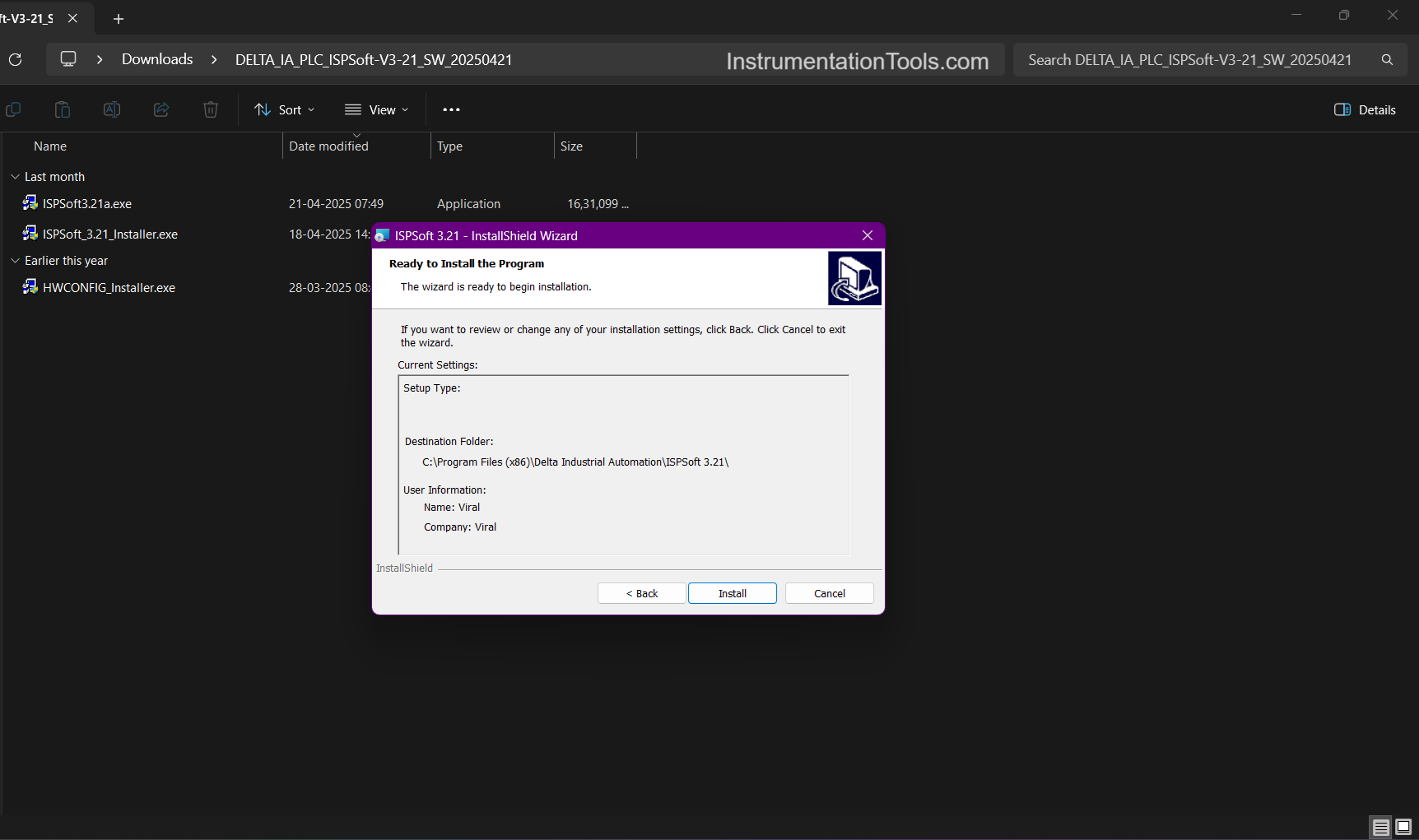
Next, after it has been installed, you will be prompted to install the hardware configuration software as shown in the window below. Click the install button and start the process.

Once done, your installation is finished. Just click the close button to finish the process.

Once installed, the software can now be used and is free of cost. Always read some demo projects of this software if available, for further guidance on development. If not, then refer to the help file catalogues for more details.
As seen earlier in the post, Microsoft Visual C++ Redistributable is a prerequisite, which allows the components of the software developed using Microsoft Visual C++ to run on your PC. Nowadays, most of the software developers use it due to legacy frameworks. If you face any issues in installing it, you can also download this from the official Microsoft website.
So, to quickly brief the installation process, the following steps are:
- Welcome to the installation process.
- Install Microsoft Visual C++ Redistributable 2013, if not pre-installed on your PC.
- Accept the terms and conditions
- Enter the username details and organization name details, with who is going to use this software on your local PC.
- Start the installation and finish ISPSoft.
- Start the installation of HWCONFIG and finish it.
In this way, we saw how to install ISPSoft software on your PC.
Read Next:
- Configure Analog Inputs and Outputs in Delta PLC
- Star Delta Starter using Functional Block Diagram
- How to Download WPLSoft? Delta PLC Software
- Guidelines to Download Free Robotics Software
- Communicating Delta PLC Software to Simulator