In this guide, we’ll help you understand what DIA Web Designer is and how to install it properly on your PC. In Delta Electronics, especially their DOP-300 series HMI, one important tool you need to learn is DIA Web Designer. This software is designed specifically to program and customize the interface of DOP-300 HMIs.
What is DIA Web Designer?
DIA Web Designer is an HMI programming software created by Delta Electronics. It’s used to design user interfaces for the Delta HMI screens.
But here’s what makes it special:
Once you design your screens using this software and download them into the HMI device, you can access and operate the HMI directly through a web browser – no need to open the software again!
So whether you’re on a PC, mobile, or tablet, you can open the HMI’s web page and monitor or control the process in real time.
This is why it’s called a “web designer” – it lets you build the HMI display and view it like a website through your browser.
Key Features:
- Design HMI screens easily on your PC
- Download and deploy the screens to the HMI
- Access live HMI display via web browser (without any software)
- Supports mobile-friendly viewing
- Great for remote monitoring and control
Software Compatibility & Details
- Supported Operating Systems: Windows 8, 10, and 11
- Latest Version: V1.0.0 (Released on 7th March 2025)
- File Size: Approximately 248 MB
- Languages: Available in multiple languages
- Resource Usage: Light on system resources, easy to install
Why Should You Learn It?
For students and beginners in automation, learning DIA Web Designer is a great way to understand how modern HMI systems work, especially when it comes to remote monitoring and web-based control. It’s a valuable skill that fits well into today’s smart factory environments.
Download Delta HMI Software
Go to Google Chrome > Search for “Deltaww” > Open Delta Electronics website > Go to Downloads Section > Search DIAWebDesigner > Software Download

You can also use the below direct link to start the Delta HMI software download instantly.
There, you will find the name – DIA Web Designer V1.0.0. Just click the link and the software will start downloading on your PC.
Important Safety Tip:
Always download the software only from Delta’s official website. Avoid using unknown or third-party sources, as they might contain harmful files.
It’s a good idea to keep an updated antivirus running on your PC to stay protected. Sometimes, antivirus programs may block the installation even when the file is safe. If that happens, and you’re sure the software came from the official Delta site, you can temporarily pause the antivirus just for installation. Once done, turn it back on immediately.
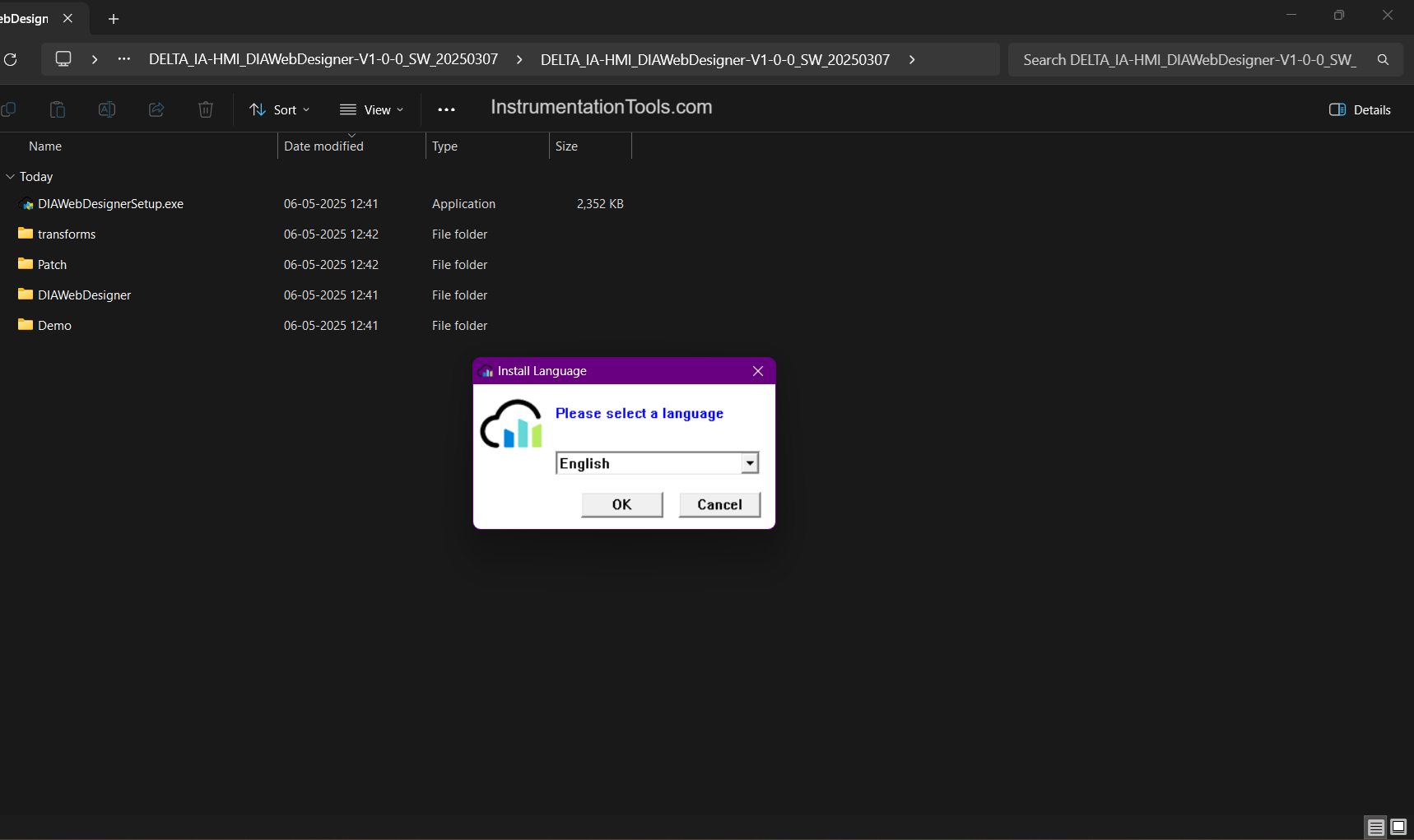
Once downloaded, start the setup by clicking the setup file and run it as an administrator. The following window will show as below. Select the language you need to assist you with the installation. I will choose English and click Ok.
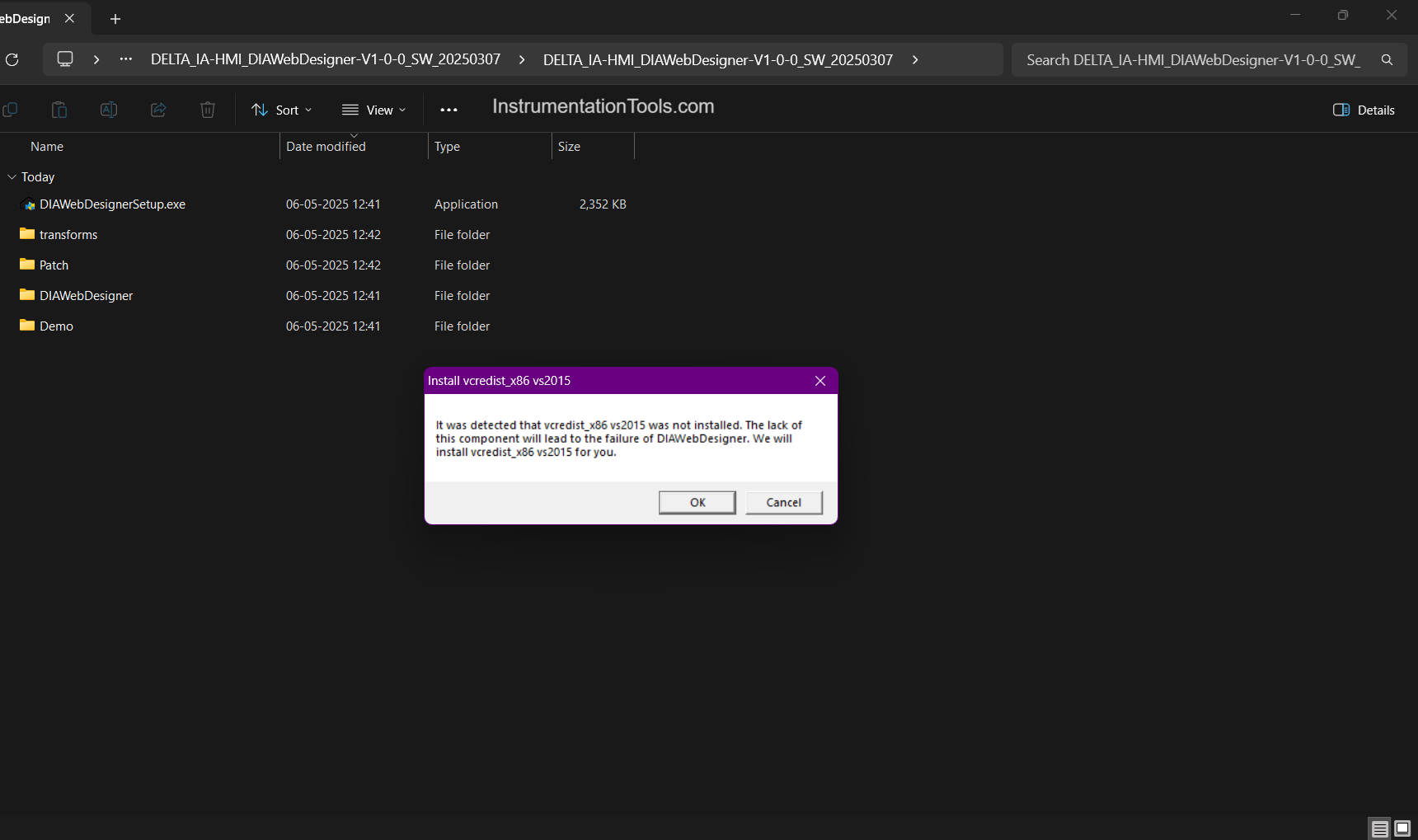
Once started, the following window will show, depicting if the vcredist x86 setup is not present on your laptop. Just click Ok, and that software will start installing first, which is a prerequisite for the software.
Next, the following window will show if Microsoft Visual C++ 2015 Redistributable is not present on your PC. Just agree to the terms and click the install button.

Next, you have to finally agree to the terms, choose the installation path, and click the install button. By default, the Windows OS path will be chosen to install, but you can choose according to your path.

The software will start installing on your PC now, and when done, the below window will show, where just click the finish button.

Once the software is installed, you can start using it right away — and the best part is, it’s completely free. To help you learn faster and work more easily, try checking if the software includes any demo projects. These sample projects can give you a clear idea of how things work. If you don’t find any, don’t worry — the built-in help section or user manuals can guide you step by step.
Also, as mentioned before, Microsoft Visual C++ Redistributable is needed for the software to work properly. This is a common setup file that helps your computer run programs built using Microsoft tools. Many automation programs depend on it. If there’s any trouble during installation, you can simply download the latest version of this package from the official Microsoft website.
For a quick installation process, follow the steps here:
- Welcome to the installation process by choosing your desired language.
- Install Microsoft Visual C++ Redistributable 2015, if not pre-installed on your PC.
- Choose your software installation local path for your PC.
- Start the installation and finish it.
In this way, we saw how to install the DIA Web Designer software on your PC.
Read Next:
- EcoStruxure Machine Expert Schneider PLC Software
- How to Download WPLSoft? Delta PLC Software
- Star Delta Starter using Functional Block Diagram
- Modbus Driver for SCADA Indusoft Web Studio
- Free Download ISPSoft Delta PLC Programming