Remote access has become an integral part of modern industrial automation, not just a support convenience. Engineers now routinely connect remotely for PLC programming, SCADA diagnostics, commissioning support, and troubleshooting to reduce downtime and avoid unnecessary site visits. This means a remote access tool can directly influence production continuity, safety functions, and regulatory compliance. If such access is poorly controlled—using shared credentials, always-on sessions, or unsecured cloud relays—it effectively creates an uncontrolled entry point into the automation system.
Securing Remote Access Tools
Tools like TeamViewer and AnyDesk were designed primarily for IT support, focusing on ease of use rather than industrial governance. As automation systems become more connected and exposed to external networks, these tools often fall short in areas such as access segregation, session auditing, role-based control, and compliance reporting. This gap is why alternative solutions are being discussed.
Newer or enterprise-focused tools allow tighter control over who can connect, from where, for how long, and with what level of access, while maintaining logs and traceability. In regulated industries such as pharma, water, and energy, this shift is essential to meet cybersecurity standards, satisfy audits, and protect critical processes from accidental or malicious changes. In this post, we will see TeamViewer and AnyDesk alternatives for remote automation programming.
Rustdesk
RustDesk is an open-source remote desktop solution designed as a self-hosted alternative to TeamViewer and AnyDesk. It works by deploying a RustDesk server (authentication and relay) either on-premises or in a private cloud. Both the engineer’s laptop and the site’s industrial PC connect outbound to this server, allowing remote access without exposing plant devices directly to the internet. Because the server is under the organization’s control, all session routing, authentication, and encryption endpoints are owned by the plant or OEM, which is a major advantage in automation environments.
The main strength of RustDesk is data ownership and transparency. There is no dependency on vendor-controlled cloud infrastructure, which aligns well with OT cybersecurity principles and IEC 62443 expectations (This means the system doesn’t rely on the cloud servers controlled by the software company. Instead, the company or plant manages everything itself. This is better for industrial (OT) security and follows the international safety and cybersecurity standard IEC 62443. It supports encrypted sessions, access control, and device whitelisting and can be layered behind VPNs and firewalls. From an automation perspective, it is ideal for accessing engineering workstations used for PLC, SCADA, or DCS programming.
The weakness of RustDesk is that security depends entirely on configuration and maintenance. There is no out-of-the-box industrial compliance model, no built-in approval workflows, and limited audit depth compared to enterprise zero-trust tools. It requires IT/OT collaboration to manage servers, updates, and backups. Poorly managed, it can become as risky as any generic remote tool (This means the tool doesn’t come with ready-made industrial security rules, automatic approval steps, or detailed logging like big enterprise tools. You need the IT and operations teams to work together to manage the servers, updates, and backups. If it’s not set up properly, it can be just as risky as regular remote access software).
Teleport
Teleport is a zero-trust access platform that acts as a secure access gateway rather than a simple remote desktop application (lets you connect to computers or servers safely; and unlike a normal remote desktop app, it doesn’t just give direct access but acts like a gateway that checks and controls every connection). It works by enforcing identity-based access using certificates, short-lived credentials, and multi-factor authentication. Engineers authenticate to Teleport first, and only then are allowed to access specific resources such as RDP sessions, SSH endpoints, or web-based applications. Access is time-limited and role-based, and every session can be logged or recorded.
The major strength of Teleport in automation is governance and traceability. It enforces the principle of least privilege, ensuring engineers only access what they are authorized to. Sessions are auditable, which is critical for regulated industries like pharma, water, or energy. Teleport eliminates shared passwords and permanent VPN access, which are common weaknesses in traditional remote setups. It fits very well into IT/OT boundary protection models.
The weakness of Teleport is complexity and overhead. It is not plug-and-play and requires careful architecture design, integration with identity providers, and training. For small OEM machines or simple plants, it may be excessive. It also does not directly replace screen-sharing tools; instead, it controls access to them. Teleport is best suited for large, security-conscious organizations rather than quick remote troubleshooting scenarios.
Mesh Central
MeshCentral is an open-source, self-hosted remote device management and control platform.It works by installing a small program called an agent on each device you want to manage, like industrial PCs, HMIs, or servers. These agents connect outwards to a central server. Through this server, you can remotely control desktops, access terminals, transfer files, track devices, and manage power. Everything is controlled from a single web-based console, making it easier and safer to manage multiple devices.
The strength of MeshCentral lies in centralized device control. For OEMs or integrators managing dozens or hundreds of automation PCs across multiple sites, it provides visibility and control without relying on external cloud services. It supports granular permissions, device grouping, and logging. When deployed inside a secured network or behind VPNs, it aligns well with OT access control strategies.
The weakness is that security quality depends heavily on implementation. MeshCentral gives you many configuration options, but if firewalls, passwords, or network separation are not set correctly, it can become unsafe. Compared to paid commercial tools, its screen and menus are simpler, and it does not provide very detailed security logs like advanced zero-trust tools. Also, since you host it yourself, you must regularly maintain the server, such as updates and backups. MeshCentral is powerful for scale but demands disciplined OT cybersecurity practices.
Zoho Assist
Zoho Assist is a cloud-based enterprise remote support tool designed primarily for IT helpdesk and vendor support scenarios. It works by establishing outbound connections from the client machine to Zoho’s cloud servers, allowing engineers to initiate attended or unattended remote sessions. It includes features such as session approvals, multi-factor authentication, role-based access, and activity logs.
The main strength of Zoho Assist is ease of deployment with reasonable administrative control. It is significantly more structured than consumer-grade tools and provides better user management, session tracking, and compliance features. For automation environments, it works well for temporary vendor access, supervised troubleshooting, or warranty support when quick connectivity is required (In industrial automation, this tool is best used when a vendor needs short-term access, when someone is watching or approving the session, or when quick support is needed during warranty or troubleshooting).
The major weakness is cloud dependency. All sessions are brokered through the vendor’s infrastructure, which may conflict with strict OT security policies or data residency requirements. Zoho Assist has a limited understanding of industrial network segmentation and should never be used to access PLCs directly. It must be restricted to engineering or support PCs. While safer than basic remote tools, it is still not a true industrial remote access solution.
Splashtop
Splashtop is a high-performance remote desktop solution optimized for low latency and smooth graphics. It operates primarily as a cloud-brokered service, allowing engineers to remotely access systems with minimal lag. This makes it attractive for HMI visualization, commissioning support, and real-time troubleshooting. (The tool works mainly through the vendor’s cloud servers, which helps provide a fast and smooth remote connection. Because of this low delay, it is useful for viewing HMIs, supporting commissioning work, and troubleshooting systems in real time.)
The strength of Splashtop is performance and stability. For automation engineers working with graphical HMIs, trend screens, or live diagnostics, it provides a smoother experience than many alternatives (Graphical HMIs, trend charts, and live diagnostics change very quickly on the screen. This tool sends screen updates faster and more efficiently, so the display looks smooth instead of laggy or frozen. Because of this, engineers can see real-time values, trends, and alarms clearly, making troubleshooting and commissioning easier compared to slower remote access tools.) It supports strong encryption, MFA, and device authorization, making it reasonably secure for controlled environments.
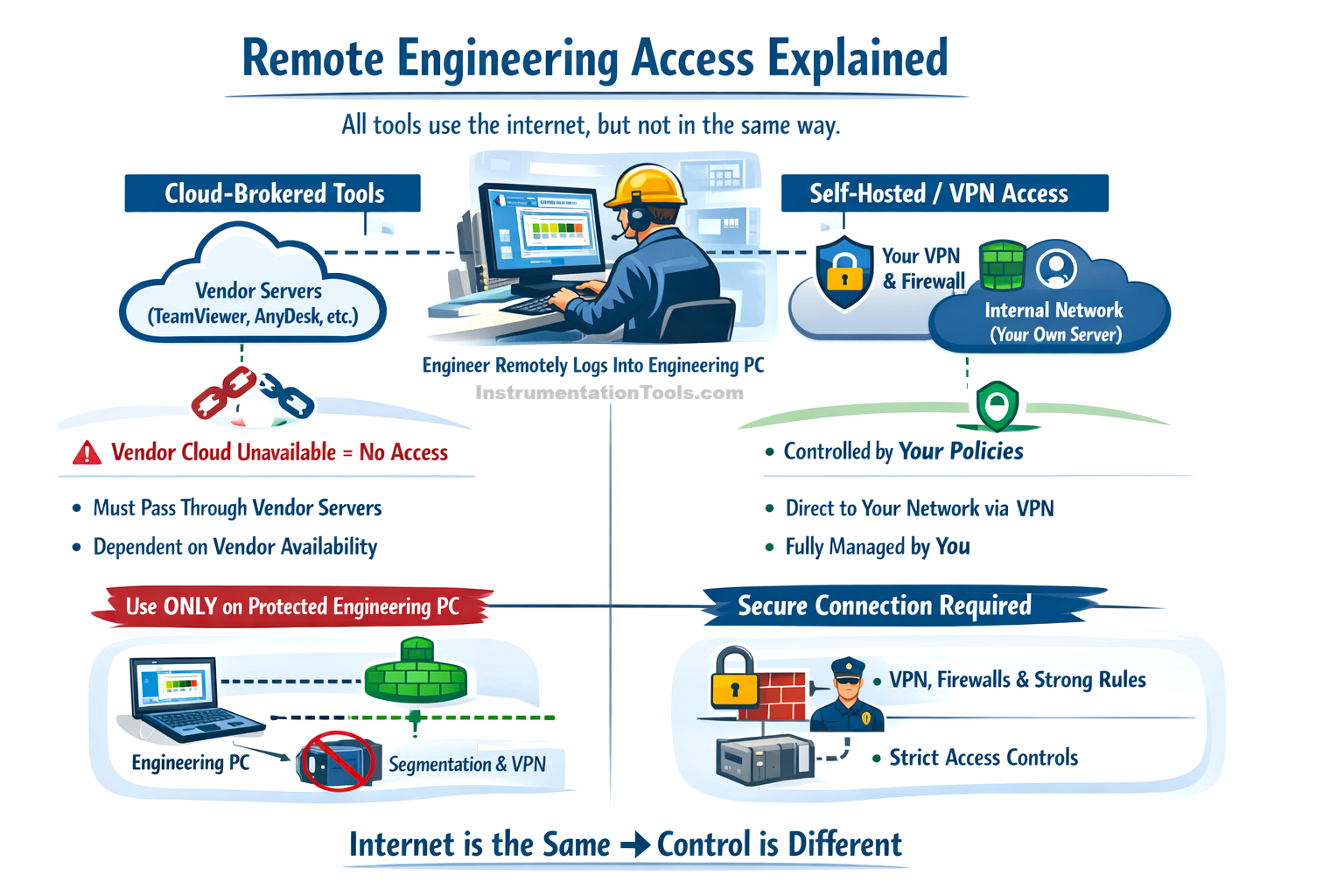
The weakness is that Splashtop is not designed for OT governance. It lacks deep session auditing, industrial role separation, and native compliance alignment. Like other cloud tools, it introduces dependency on external servers and internet availability. It should only be used on intermediate engineering PCs and combined with network segmentation and VPNs. (Because this tool works through external cloud servers, it will not work if the internet is down or if the cloud service has an issue. Also, since it is cloud-based, it should not be connected directly to PLCs or control networks. Instead, it should be used only on an engineering PC that sits between the internet and the PLC network. All remote tools use the internet, but cloud tools depend on the vendor’s servers to function, while controlled tools depend only on your own network. For safety, this setup should be protected using network separation (segmentation) and a VPN.) Splashtop is best viewed as a productivity tool, not a cybersecurity framework.
ConnectWise ScreenConnect
ConnectWise ScreenConnect is an enterprise remote access and support platform widely used by managed service providers. It can be deployed either as a cloud service or self-hosted. It allows role-based access, session approvals, detailed logging, and integration with identity systems. Engineers connect through controlled workflows rather than ad-hoc sessions.
Its main strength in automation is enterprise-grade control and auditability. The self-hosted option is particularly valuable for industrial environments where data flow must remain internal. Session recording, user permissions, and access workflows support compliance and accountability. It is suitable for large integrators or OEM service teams supporting multiple customers.
The weakness is administrative overhead and cost. Setup and management are more complex than lightweight tools, and licensing may be prohibitive for small installations. It is also a general-purpose remote support tool, not OT-specific, so correct network design is still essential. When properly deployed, however, it offers one of the most balanced solutions between usability and security.
Microsoft RDP
Microsoft Remote Desktop Protocol (RDP) is a native Windows remote access technology. When used correctly, it operates through VPNs, RDP gateways, firewalls, and network-level authentication. Engineers remotely log into a Windows-based engineering workstation as if they were physically present (The engineer connects to the remote computer and uses it exactly like sitting in front of it, with the same screen, software, keyboard, and mouse).
The strength of RDP is maturity and predictability. It is well understood, widely supported, and integrates with enterprise identity systems, MFA, and logging tools. In regulated plants, RDP is often preferred because it is easier to document, audit, and control within an IT/OT framework.
The weakness is that misconfigured RDP is extremely dangerous. Exposing RDP directly to the internet is one of the most common attack vectors in industrial environments. It also lacks built-in session approval or context awareness. RDP is safe only when combined with strong perimeter security and governance (RDP by itself does not ask for extra approval before someone connects, and it does not understand the situation, such as who is connecting, from where, or why. Because of this, RDP is only safe when it is protected by strong security at the network boundary, like VPNs, firewalls, access rules, and proper user management).
VNC
VNC is a basic remote desktop protocol used mainly in legacy systems and embedded HMIs. It works by transmitting screen updates and input events between the client and the server.
Its only strength is simplicity and compatibility, especially with older or Linux-based automation systems. When tunneled through VPNs or SSH, it can still be used safely in closed networks.
Its weakness is a lack of native security. On its own, VNC offers minimal encryption and authentication, making it unsuitable for modern remote access over public networks. Its use today should be limited and carefully controlled.