Most plant networks weren’t designed. They grew. A PLC panel got a switch, and the switch got a cable to the control room. Then one day someone connected the control room to the office.
Then the requests start. Management wants live production numbers in a dashboard. The historian needs to feed a reporting system. A machine builder wants to connect from another country to look at a fault.
Every one of those requests is reasonable. Every one also creates a path from the business network toward equipment that moves valves and runs motors. The real question is where you put the control point, and what kind of control it is.
This article looks at one tool that sits at that boundary: the proxy firewall. It covers what it does differently from an ordinary firewall and where it fits in a plant. It also covers the mistakes that quietly undo it.
IT and OT want different things from the same cable
IT networks are built around confidentiality and constant change. Laptops get patched every month, users come and go, and most traffic heads out to the internet.
OT networks put availability and predictability first. A controller might run the same firmware for many years. A brief network hiccup can trip a process, spoil a batch or send operators scrambling.
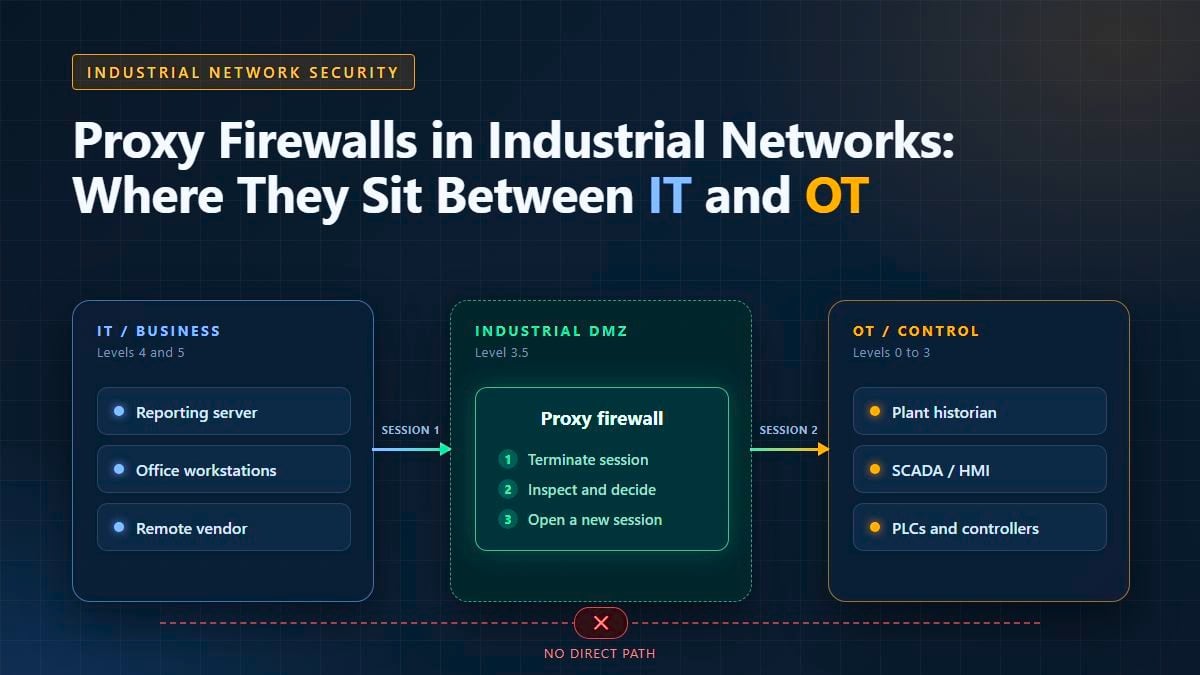
Many sites still describe this split with the Purdue model. Field devices and controllers sit at the bottom levels. Site operations, such as historians and engineering workstations, sit above them. The business network sits on top.
Between site operations and the business network, good designs add a buffer zone. People often call it the industrial DMZ, or “Level 3.5.” That buffer is where proxy firewalls do their most important work.
How a proxy firewall works, in plant terms
A standard packet-filtering firewall looks at addresses, ports and connection state. If a packet from the office to the historian matches an allow rule, it passes through untouched. The firewall never really understands what the packet says.
A proxy firewall works differently. The client connects to the proxy, not to the real destination. The proxy reads the request at the application layer and checks it against policy. If the request is allowed, the proxy opens a second connection of its own.
So there are always two separate sessions. One runs from the client to the proxy. The other runs from the proxy to the server. Nothing from the first session reaches the server unless the proxy rebuilds it.
If you want a step-by-step refresher on how a proxy firewall works, ProxyEmpire’s guide walks through the terminate, inspect, decide and re-originate loop. It also compares application-level and circuit-level gateways in plain language.
In a plant, that two-session design has a name most control engineers will recognize: a protocol break. Traffic from the business side cannot flow straight into the control network. It has to be received, understood and recreated first.
Why the protocol break matters more in OT than in IT
Office systems can usually defend themselves to some degree. They run endpoint protection, get regular patches and are built to expect hostile traffic. Plenty of industrial devices can do none of that.
Classic Modbus TCP is a good example. It has no authentication at all, so any device that can reach a controller can send it commands. Some older controllers can also hang or reboot when they receive malformed or unexpected packets.
A proxy in the path changes the picture. Because it has to parse each request before forwarding it, malformed traffic tends to die at the proxy. The controller only ever sees requests the proxy built itself.
Protocol-aware proxies can go further and filter by what a request actually does. For Modbus, a policy might allow read function codes such as 3 and 4 while blocking writes. The write codes include 5, 6, 15 and 16.
That turns a vague rule like “allow the historian to talk to the PLC” into something much tighter. The historian can read values all day, but it can’t change a setpoint, even if it’s compromised.
Where proxy firewalls sit in a typical plant
There isn’t one correct spot. Most mature designs use proxy functions at several boundaries, each with a different job.
- At the industrial DMZ. This is the main one. Firewalls on both sides only allow sessions that end on a server inside the DMZ. IT and OT never talk directly.
- At cell or area zone boundaries. Inside the plant, a protocol-aware gateway can sit between site operations and a specific production line. It limits which stations can send which commands to that line’s controllers.
- On the remote access path. Vendors and remote engineers connect to a gateway in the DMZ, never straight to a controller. From there, a jump host gives them a controlled, recorded session.
- On outbound web traffic. Engineering workstations sometimes need vendor portals for licenses, firmware or documentation. A forward web proxy with a short allowlist covers that without opening general internet access.
What actually lives in the DMZ
An industrial DMZ isn’t a pass-through. It’s a small network of servers that act as go-betweens. Typical residents include:
- A historian replica. The plant historian pushes data out to a mirror in the DMZ, and business users query the mirror instead of the original.
- Patch and antivirus staging. Updates are downloaded and checked in the DMZ, then pulled down into OT on the plant’s own schedule.
- A remote access gateway. It handles multi-factor authentication, approval and session recording before anyone reaches a jump host.
- A file transfer point. Files moving in either direction land here first and get scanned, instead of travelling on USB sticks.
- An OPC UA aggregation server or MQTT broker. Plant systems publish data to it, and IT applications subscribe from their side.
Notice the pattern. Every connection ends at a server in the DMZ, and a separate connection carries data onward. That’s the same two-session logic as a proxy firewall, applied to whole services instead of single requests.
A useful test during design reviews is simple. Pick any business system and ask whether it can open a session that ends on an OT device. If the answer is yes, the DMZ has a hole in it.
Three everyday scenarios
Production data for the business
A plant manager wants yesterday’s throughput and downtime in a web dashboard. The tempting fix is a firewall rule from the reporting server straight to the plant historian.
The cleaner route is a replica in the DMZ. The OT historian pushes data outward on a schedule, so the connection starts on the plant side. If the dashboard is a web app, a reverse proxy in the DMZ publishes it to office users.
Nobody in the office ever touches the real historian. If the reporting server gets infected, it can only reach a copy.
A machine builder needs to troubleshoot
A packaging line faults at night, and the machine builder’s engineer is in another time zone. They need to look at the PLC program and maybe adjust a timer.
Their session should land on the remote access gateway first. After authentication and approval from someone on site, they get a jump host with the engineering software installed. The jump host then reaches only that one line.
The session is recorded, and access closes when the job is done. That’s far easier to defend in an audit than a permanent VPN account with reach into the whole control network.
An engineering workstation needs a vendor portal
Some engineering packages need online license checks or downloads from the vendor. Giving the workstation general internet access to solve that is a big jump in exposure.
A forward web proxy in the DMZ can allow only the vendor’s own domains. Everything else is refused and logged. If something on the workstation tries to reach an unknown server, the proxy log is often the first place it shows up.
Proxy firewall, industrial DPI firewall or data diode?
These three get mixed up in specs and vendor meetings. They solve related problems in different ways.
- Proxy firewall. It terminates each connection and creates a new one. That gives the strongest separation between sessions and detailed application logs, at the cost of some latency and configuration effort.
- Industrial DPI firewall. It inspects industrial protocols inline and can block specific commands. Many don’t fully terminate the session, so check whether a given product is a true proxy or an inline filter.
- Data diode. This is hardware that lets data travel in one direction only. Some sites use it where the risk justifies the cost and the loss of flexibility. It suits one-way data feeds, but it can’t support remote access or anything that needs a reply.
Plenty of plants combine them. A data diode might export historian data from the most critical zone, while proxies handle remote access and updates elsewhere.
Mistakes that quietly undo the design
- “Temporary” any-any rules. A rule opened for a commissioning weekend tends to survive for years. Give every exception an owner and an expiry date.
- Dual-homed machines. A PC with one network card in the office and another in the plant bypasses every firewall you bought. Look for them in every audit.
- Control traffic through the proxy. Proxies add latency, and time-critical traffic shouldn’t depend on them. Much real-time control traffic stays inside its cell anyway, and some, like PROFINET real-time frames, isn’t routed over IP at all.
- TLS inspection without a plan. Decrypting traffic at the proxy needs certificates the clients trust. Some industrial software pins its own certificates and simply breaks, so test before rollout.
- An unpatched proxy. The proxy is now the most exposed box between IT and OT. It needs hardening, patching and monitoring at least as strict as anything it protects.
- No failure plan. When a proxy goes down, the data flows it carries stop. Agree with operations which flows can wait and which can’t, and build in redundancy where an outage isn’t acceptable.
- Logs nobody reads. Application-level logs are one of a proxy’s biggest strengths. Send them somewhere people actually review them.
A quick checklist before commissioning
- List every flow between IT and OT, with its source, destination, protocol and business owner.
- Confirm each flow ends on a DMZ server, with no direct sessions passing through.
- Restrict industrial protocol access to the commands each system really needs, read-only wherever possible.
- Route remote access through one gateway with multi-factor authentication, approval and session recording.
- Limit outbound web access from OT to a named allowlist.
- Test failure modes during a planned outage, not during a real one.
- Schedule regular rule reviews and remove anything without an owner.
Wrapping up
The IT/OT boundary is where most plant security designs succeed or fail. A packet filter decides who is allowed to talk. A proxy firewall also decides what they’re allowed to say, and makes sure they never speak directly.
That’s why proxies belong in the industrial DMZ, on the remote access path and at sensitive zone boundaries. Put them there, keep time-critical control traffic off them, and treat the proxy as critical equipment in its own right.
Done well, the result is a plant that can share its data freely without sharing its controllers. That’s usually the balance both the IT team and the control engineers were after in the first place.