In modern industrial automation systems, OPC servers act as a bridge between PLCs and higher-level applications such as SCADA, HMIs, and historians. A common issue encountered in plants is when the OPC server shows a healthy connection status, but several tags stop updating or remain stuck at their last value.
This situation can be confusing because the communication channel appears active, yet the real-time data flow is partially interrupted. Such behavior usually indicates problems related to tag configuration, scan rates, PLC communication load, or subscription handling rather than a complete network failure.
OPC Server Connected but Not Updating Several Tags
Understanding the possible reasons behind this condition is essential for engineers to diagnose the problem quickly and ensure reliable data exchange between control systems and monitoring platforms.
PLC address mapping mismatch
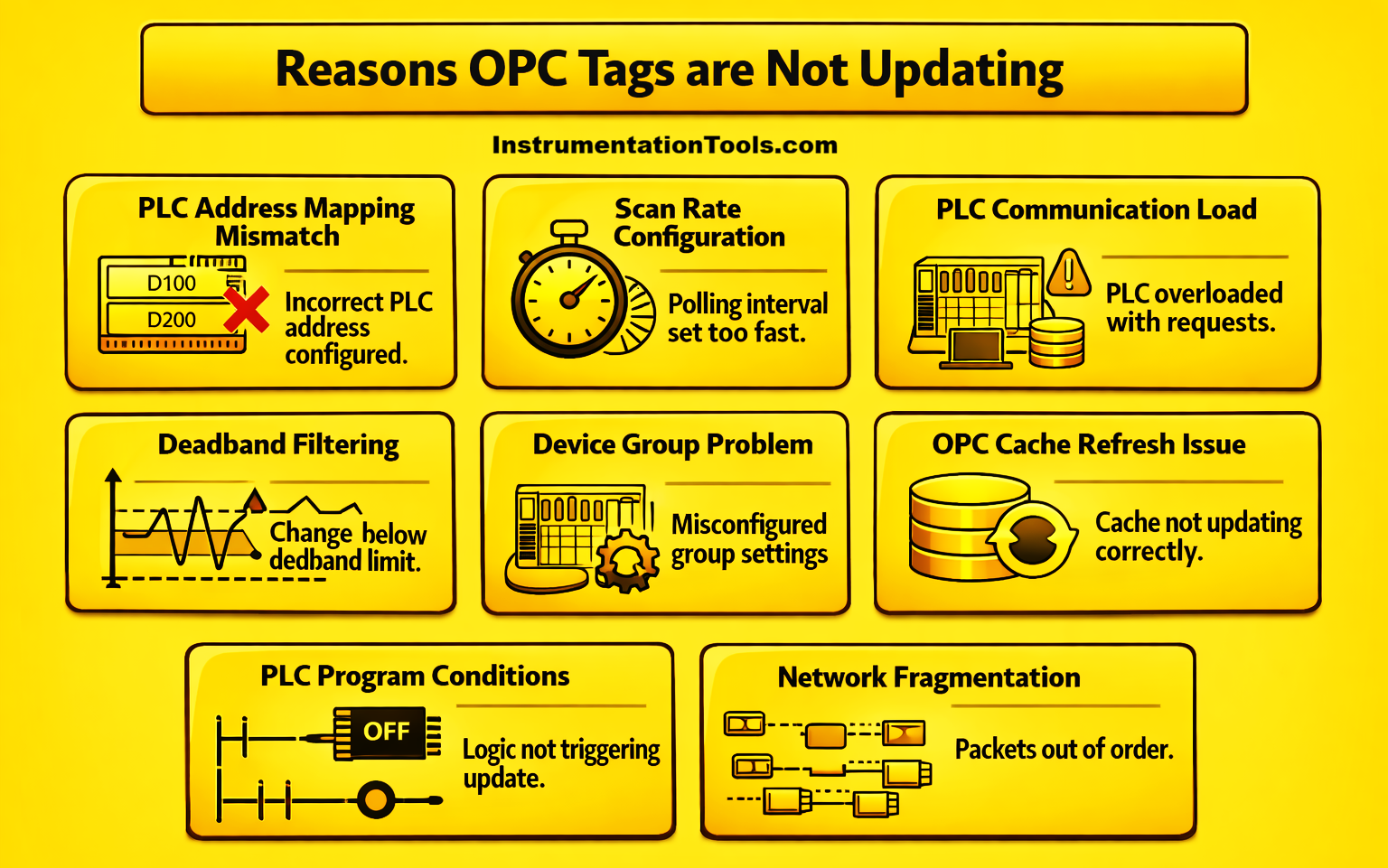
One of the most common reasons for OPC tags not updating is a mismatch between the PLC memory address and the address configured in the OPC server. In many industrial systems, PLC programs are frequently modified during commissioning, maintenance, or process optimization. During these changes, variables may be moved to different memory locations, data blocks may be reorganized, array indexes may shift, or data types may be modified. However, the OPC server configuration often remains unchanged.
As a result, the OPC server continues reading from the old address, which may no longer contain valid or changing data. In some cases, the address may still exist, but the PLC logic is no longer writing values to it, causing the OPC tag to remain frozen at the last value received. This situation creates confusion because the OPC connection status appears healthy, but specific tags show bad quality or stale values. Therefore, whenever tags stop updating while the OPC connection is active, verifying the PLC address mapping and comparing it with the OPC tag configuration is an important diagnostic step.
Subscription or scan rate configuration issues
Another common reason for OPC tags not updating is related to subscription settings or scan rate configuration in the OPC server. OPC communication typically works on a polling or subscription mechanism, where the server periodically reads data from the PLC and updates the connected clients. If the scan rate is configured too fast, the OPC server may generate more requests than the PLC or network can handle efficiently. This can result in missed update cycles or delayed responses for some tags.
In systems with large tag counts, such as thousands of variables being monitored by SCADA or historians, aggressive polling intervals can overload the communication driver. As a result, some tags may update normally while others appear frozen or update intermittently. Additionally, if subscription buffers become full or if the OPC client requests very fast refresh rates, the server may start skipping certain updates to maintain overall performance. In such cases, the connection status still appears healthy, but the actual data refresh for several tags becomes inconsistent.
PLC communication load saturation
In many industrial control systems, PLCs are connected to multiple devices simultaneously, such as SCADA systems, HMIs, historians, engineering workstations, and sometimes even maintenance laptops. Each of these systems continuously reads data from the PLC for monitoring, logging, or control purposes. When the number of communication requests becomes too high, the PLC’s communication processor may reach its handling limit. At this point, the PLC begins prioritizing certain requests while delaying or dropping others.
As a result, the OPC server may remain connected to the PLC, but some tag read requests are not served within the expected scan cycle. This leads to situations where several tags update normally while others remain stuck at their previous values. The issue becomes more noticeable in systems with high tag counts, fast polling intervals, or when multiple OPC clients are accessing the same PLC simultaneously. Even though the network connection is stable, the PLC communication load prevents consistent data updates for all tags.
Deadband filtering
Deadband filtering is another factor that can cause OPC tags to appear as if they are not updating. Many OPC servers implement a deadband feature to reduce unnecessary data traffic between the server and connected clients. Deadband defines the minimum amount of change in a tag value that must occur before the OPC server sends an update to the client. If the actual change in the PLC value is smaller than the configured deadband limit, the OPC server considers the change insignificant and does not transmit the update.
As a result, the tag in the SCADA or OPC client continues to display the previous value even though the PLC value may be changing slightly. This behavior is particularly common with analog signals such as pressure, temperature, or flow values, where the change may be very small over short periods. While deadband filtering helps optimize communication performance, incorrect configuration can create the impression that certain tags are frozen or not updating properly.
Device group or topic configuration problem
In many OPC servers, PLC connections are organized using device groups, channels, or topics to manage communication efficiently. Each group typically represents a specific PLC connection, driver configuration, or communication path. If there is a configuration issue within one of these groups, such as an incorrect driver setting, wrong PLC rack or slot number, incorrect IP mapping, or communication timeout parameters, only the tags associated with that particular group may stop updating.
Meanwhile, tags belonging to other groups continue working normally, which can make the issue difficult to identify at first. Since the OPC server itself remains connected, the overall server status still appears healthy. However, the misconfigured device group prevents proper data exchange for the tags assigned to it. This type of issue often occurs after system upgrades, PLC replacements, or changes in network configuration, where the OPC server settings are not updated accordingly.
OPC cache refresh issue
Many OPC servers internally use a cache mechanism to manage data exchange between PLCs and OPC clients such as SCADA, HMIs, or historians. Instead of sending a request to the PLC every time a client asks for a value, the OPC server periodically reads the data from the PLC and stores it in its internal cache. Clients then receive the value from this cache, which helps reduce communication load and improves system performance.
However, if the OPC server fails to refresh this cache properly due to driver delays, communication timing issues, or internal processing overload, the stored value may remain unchanged. In such cases, the OPC server still reports a healthy connection to the PLC, but several tags appear frozen because the cache is not receiving fresh data. This creates a situation where the system seems connected and stable, yet some tags do not reflect the latest PLC values.
PLC program scan conditions
In some cases, the reason for tags not updating is related to the way the PLC program itself is written. Certain variables in the PLC are updated only when specific logic conditions are satisfied, such as when a machine is running, a particular sequence step is active, or a control bit is enabled. If those conditions are not met, the PLC may stop writing new values to those memory locations.
As a result, the OPC server continues reading the same value repeatedly from the PLC, giving the impression that the tag is not updating. Since the communication between the OPC server and PLC remains healthy, the connection status does not show any fault. This situation is commonly observed in batch processes, machine sequences, or interlocked operations where data updates are tied to operational states. Therefore, checking the PLC logic and understanding when a variable is actually updated in the program is an important step when diagnosing tags that appear frozen in the OPC client.
Network packet fragmentation
In Ethernet-based industrial communication protocols, large volumes of data are often transferred between PLCs and OPC servers. When the OPC server requests many tags in a single cycle, the PLC may respond with large data packets. If the packet size exceeds the network frame limits, the data gets divided into multiple smaller packets during transmission, a process known as fragmentation.
In congested networks or systems with heavy communication traffic, some of these fragmented packets may arrive late or out of order. When this happens, the OPC server may not be able to reconstruct the complete data response correctly within the expected polling cycle. As a result, certain tags fail to update while others continue updating normally. Since the network connection itself is still active and responding, the OPC server continues to show a connected status, even though partial data updates are being missed.
In this way, we saw how OPC servers are connected, but the data is still not updating.