A replacement HMI can fit the panel cutout and power up correctly, yet still leave the machine unavailable. The missing piece may be an editable project, a communication setting, a recipe file, or the software needed to restore the application.
Before removing the old terminal, establish what you can recover and where you can recover it. A folder named “HMI backup” is a starting point. You also need to know what the file contains, which tool can use it, and which target device it supports.
This guide focuses on machine-level operator panels. The examples illustrate preparation and verification; the transfer procedure must match the actual terminal, software version, and approved maintenance plan.
Define the replacement before choosing the backup method
First identify the intended path. Restoring an identical terminal, changing devices within an engineering platform, and migrating to another platform require different preparation.
For a same-model replacement, establish that the backup method supports the target hardware and its required software or firmware. For a device change, determine whether the engineering software supports the new target and what conversion changes are involved. For a platform migration, expect to examine the application’s functions, communication drivers and data handling individually.
A manufacturer’s successor designation helps identify a candidate, but it does not establish that an existing backup can be loaded into it. Record the exact source and target models before relying on a restore or conversion procedure. A broader industrial HMI replacement guide can help organize the compatibility checks across these different paths.
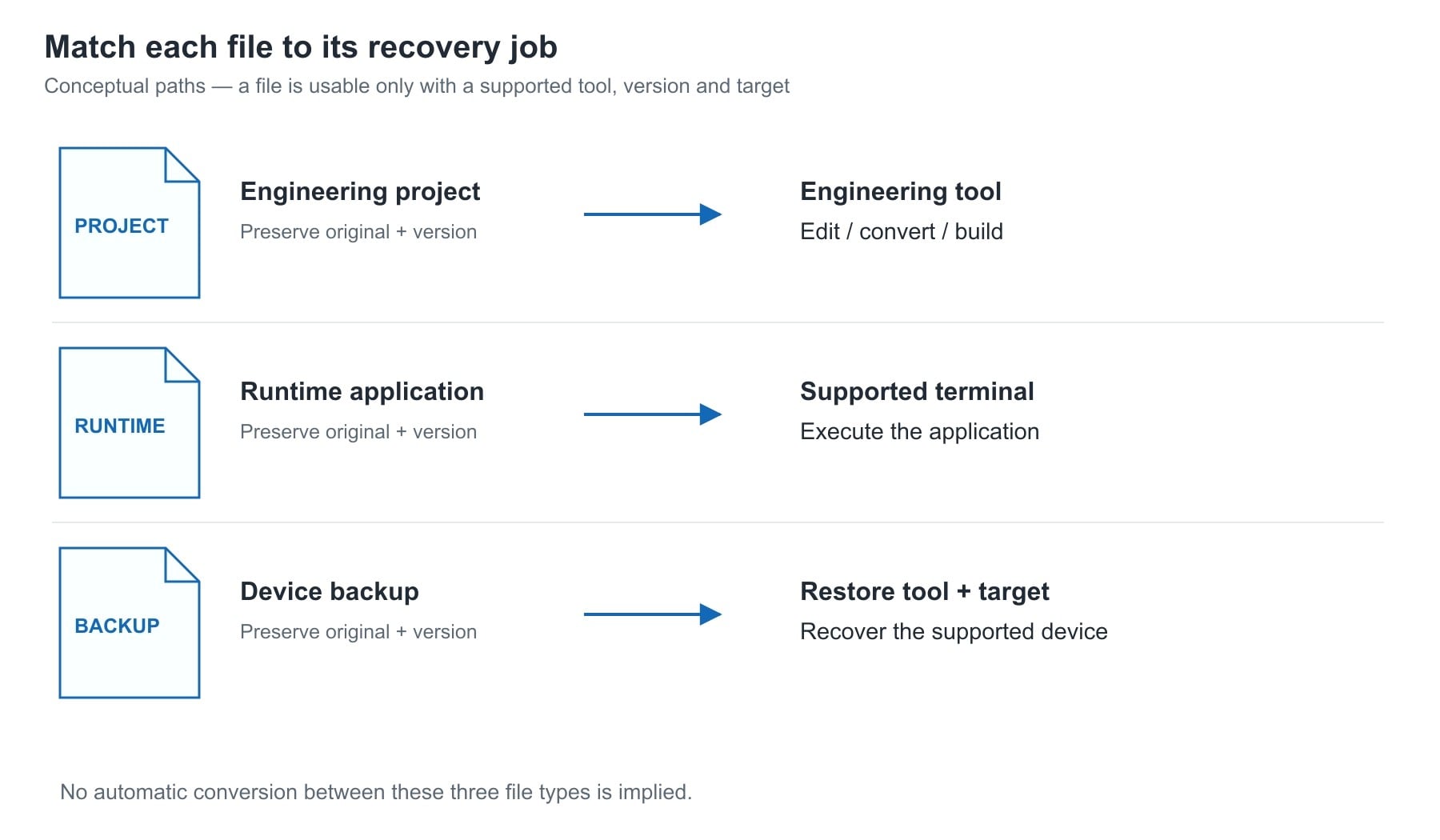
Separate the project, runtime application and device backup
These files are often grouped together as backups, but they answer different questions.
An editable engineering project is the material used to develop and maintain the application. It may contain screens, tags, alarm definitions, scripts, connections and other configuration. Preserve the project with its engineering software version, required libraries and authorized access information. Opening it in a newer tool may create a converted copy; retain the original before conversion.
A runtime application is prepared for execution by a supported runtime or terminal. Keep a copy where the platform permits, together with the target and version information. Possessing a runtime file does not, by itself, establish that you can recover editable source or use it on another terminal generation.
A device backup preserves the items covered by a particular backup method. Depending on the platform and selected option, that may include an operating system, application, settings, user data or licenses. Its value depends on the supported restore destination and the actual contents.
Siemens provides a useful example of this distinction. Its Backup/Restore application example, V2.0, states that the backup file described there cannot be opened and edited in WinCC (TIA Portal); it is restored to the original panel or a panel of the same type. This is a specific restore capability, not an editable project or a general migration file.
Rockwell’s FactoryTalk View ME documentation likewise treats importing an application and transferring an application to a terminal as separate operations. Its import guidance describes conversion of communication references and application settings, while its transfer guidance addresses the drivers and utility used to move a file to the terminal.
Capture the installed terminal and its connections
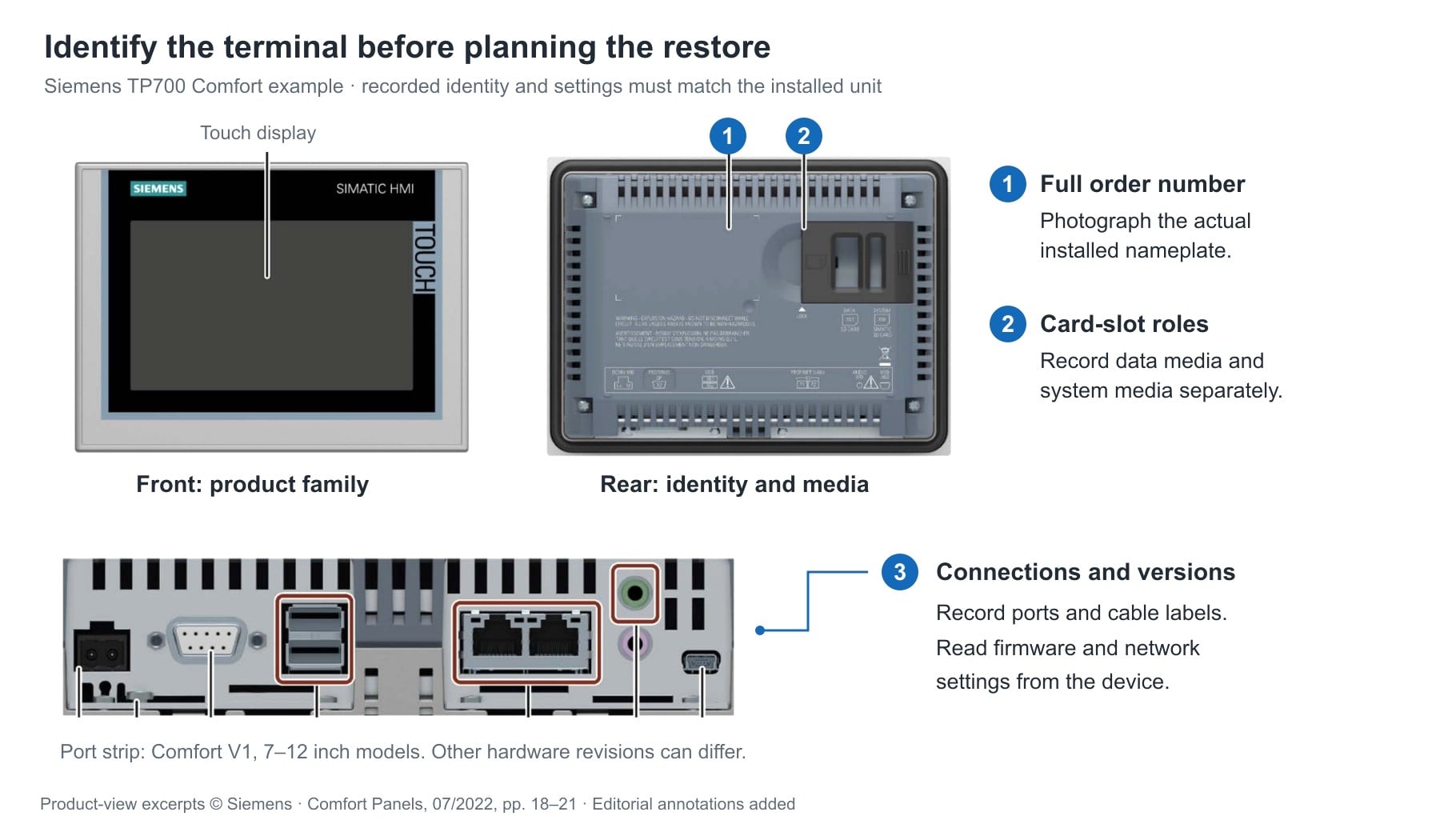
Photograph the nameplate, accessible connectors and cable identification before disturbing the installation. Figure 1 uses documented TP700 Comfort views to illustrate this collection task. In that example, the rear layout includes separate data and system card positions; the port layout also differs between hardware versions. Identify the installed revision rather than relying on a similar-looking front panel. Record the full catalog or order number, hardware revision where applicable, firmware or operating-system version, and application identification available from the terminal.
Record the connection configuration as well as the physical port. An Ethernet cable does not tell you the controller address, driver, communication route or application shortcut. For serial connections, preserve the protocol, port settings and any converter or gateway configuration that the installation relies on.
Collect these records using approved access methods. Cabinet inspection, wiring access and removal require the site’s electrical isolation procedure and qualified personnel. Do not disconnect a running panel to identify a cable.
Use a compact recovery record to connect each item to its verification:
| Item to preserve | Record or collect | Verify before removal |
|---|---|---|
| Terminal identity | Full model, relevant hardware revision, firmware/OS and application identification | The proposed target is covered by the intended restore or conversion method |
| Editable project | Original project or archive, engineering version and dependencies | A working copy opens in the appropriate tool; missing libraries and access restrictions are identified |
| Runtime or device backup | Supported upload/backup, selected backup type, tool version and capture date | The tool recognizes the file and the documented method supports the target |
| Controller communications | Driver, controller address, route/shortcut, protocol and relevant port settings | The recorded connection agrees with the installed application and target capabilities |
| Operational data and security | Applicable exports, storage locations, user recovery method, certificates and license records | Required items are included or have a separate supported recovery path |
| Physical installation | Cutout, mounting, supply, connectors, adapters and cable labels | The target can be installed under the approved mechanical and electrical design |
Keep passwords, private keys and other secrets in the organization’s approved secure repository. The maintenance record should identify how authorized staff obtain them, without exposing them in ordinary photographs or a shared spreadsheet.
Check what sits outside the screen project
Imagine a batch-mixing application whose HMI displays a recipe selector, temperature trend, alarm summary and operator login. Recovering the screen layout does not establish that the current recipe values, historical records or user permissions will be recovered with it.
This is an illustrative application, not a reported field incident. For each function, identify where its configuration and current data actually reside. A recipe definition might belong to the HMI project while current values are held elsewhere. Logs may be on removable media or an external system. User authentication may be local or depend on another service.
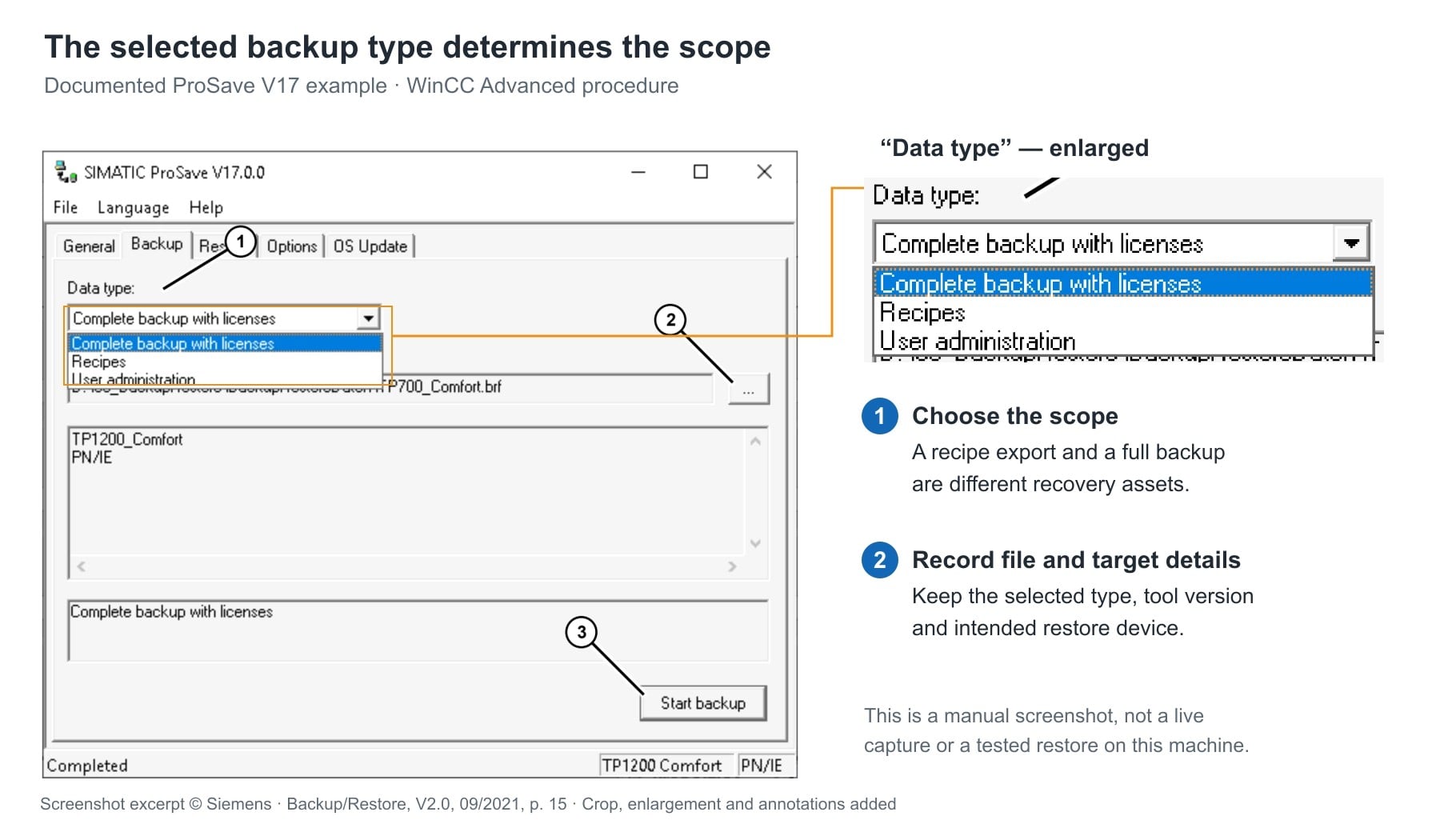
In the Siemens example described above, ProSave offers distinct backup selections for complete backup with licenses, recipes and user administration in the described WinCC Advanced procedure. The WinCC Unified panel procedure separately lists complete backup, runtime project and user-management data. These options demonstrate why the selected backup scope matters; they are not a list of options available on every Siemens panel or firmware version.
Preserve the current approved recipe data and confirm units and field meanings. Identify whether alarm history and production logs must be retained for operations or traceability. Record any removable storage and its role before removing it.
For licensed functions, identify the entitlement, activation method and supported transfer or recovery process. Where certificates are used, determine the supported export, renewal or re-enrollment path. Some credentials cannot simply be copied to another device. Mark these as dependencies to resolve rather than assuming a full backup makes them portable.
Verify the files before the maintenance window
A useful verification sequence moves from file integrity to the intended recovery operation:
- Identify the capture. Associate each file with the machine, terminal, date, capture tool and backup selection. If an earlier project is the best available source, record that its agreement with the installed application is unconfirmed until checked.
- Preserve an original. Store a protected original and work from a copy. Keep a separate controlled copy so that the terminal, removable media and sole backup do not share one point of loss.
- Check readability. Confirm the archive can be accessed and the relevant vendor tool recognizes the file. File size or a checksum helps detect copying errors; neither proves restore compatibility or functional completeness.
- Check the target path. Resolve required tool versions, device support, firmware, drivers, libraries, licenses and access permissions. Record the manufacturer procedure that applies to the actual source and target.
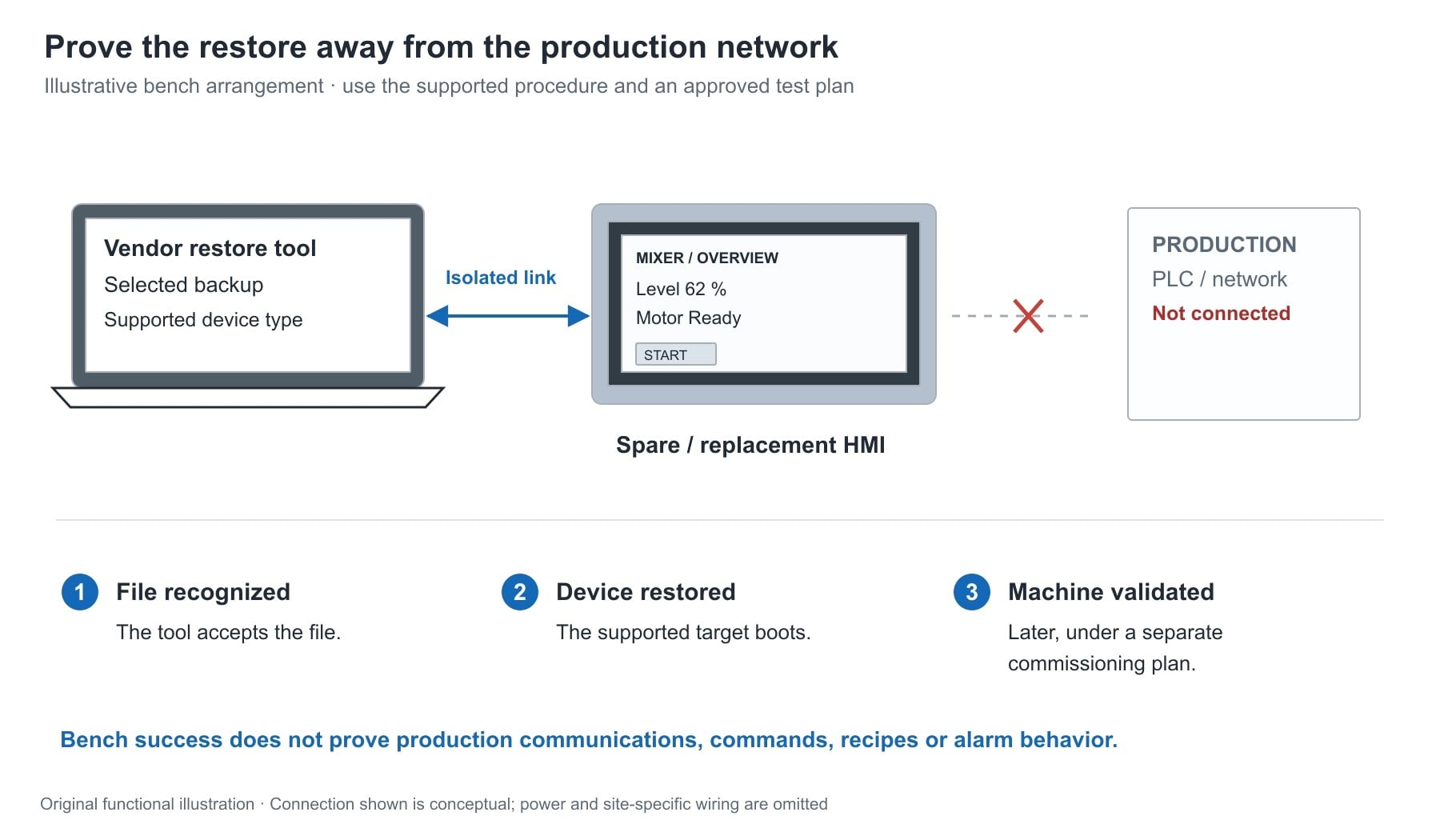
- Prove recovery where feasible. Use an approved spare or isolated test arrangement to exercise the supported restore path. Record what was tested and what still requires validation on the machine.
Keep a test terminal isolated from the production network unless its connection is explicitly planned. A restored device may carry the original network settings, and an HMI can write commands and setpoints. A successful bench restore is valuable evidence, but it does not establish that production communications and machine behavior are correct.
Backup itself may require an outage. In the Siemens example, certain backup methods restart the panel; restore procedures erase existing data after confirmation. Schedule the exact operation accordingly rather than treating every backup as an online, non-disruptive read.
If a test restore is unavailable, state the limitation plainly. “File recognized by the tool; restore not tested” is more useful than an unsupported “backup verified.”
Prepare acceptance checks before removing the old HMI
Capture the expected behavior while the installed system is available, using an approved observation plan. Screenshots can document layout, units and displayed status, but they do not replace project files or record every underlying configuration.
Define acceptance checks against the machine’s approved functions. Record expected results before the replacement so that commissioning is more than a visual comparison of the home screen.
| Function | Controlled verification after restoration | Evidence to record |
|---|---|---|
| Controller communication and values | Compare selected displayed values, units and status with a trusted controller or process reference | Correct values and communication quality; no unexplained stale data |
| Operator commands | Under the authorized commissioning plan, exercise permitted commands and confirm their intended destinations | Correct response and retained permissives; no unexpected actuation |
| Alarms | Use an approved test or simulation to check selected indications and acknowledgements | Correct messages, priorities and acknowledgement behavior |
| Recipes and setpoints | Verify approved records, units, permitted ranges and intended destinations before any controlled transfer | Correct values and transfer behavior |
| Users and permissions | Test representative authorized roles | Required access works and restricted functions remain restricted |
| Logs and external services | Check applicable timestamps, storage paths and external connections | Required records are retained and new data reaches its intended destination |
Loading the application and seeing a familiar screen establishes only part of the result. The operator must also receive valid information and issue the intended commands within the machine’s operating rules. Safety-function validation, where applicable, remains part of the machine’s separate approved validation process.
Before removal, assemble a handover record that names the chosen target, recovery files, required tools, unresolved dependencies, acceptance checks and rollback conditions. Retain the old terminal and its original media according to the maintenance plan until the replacement has been accepted. If the only available file has an unproven recovery path, make that uncertainty an explicit maintenance decision before the old panel is disconnected.