This article will discuss paper cutting machines using the XG5000 PLC Software. This PLC system will cut paper to a specific length and count the number of sheets cut. The system can be run automatically or manually. When the machine is running in Auto mode, the machine will stop cutting paper based on the predetermined maximum number of paper cuts. When the machine is running in Manual mode, the machine will continue to cut paper, and the Machine will only stop when the machine is turned off.
Program Objective
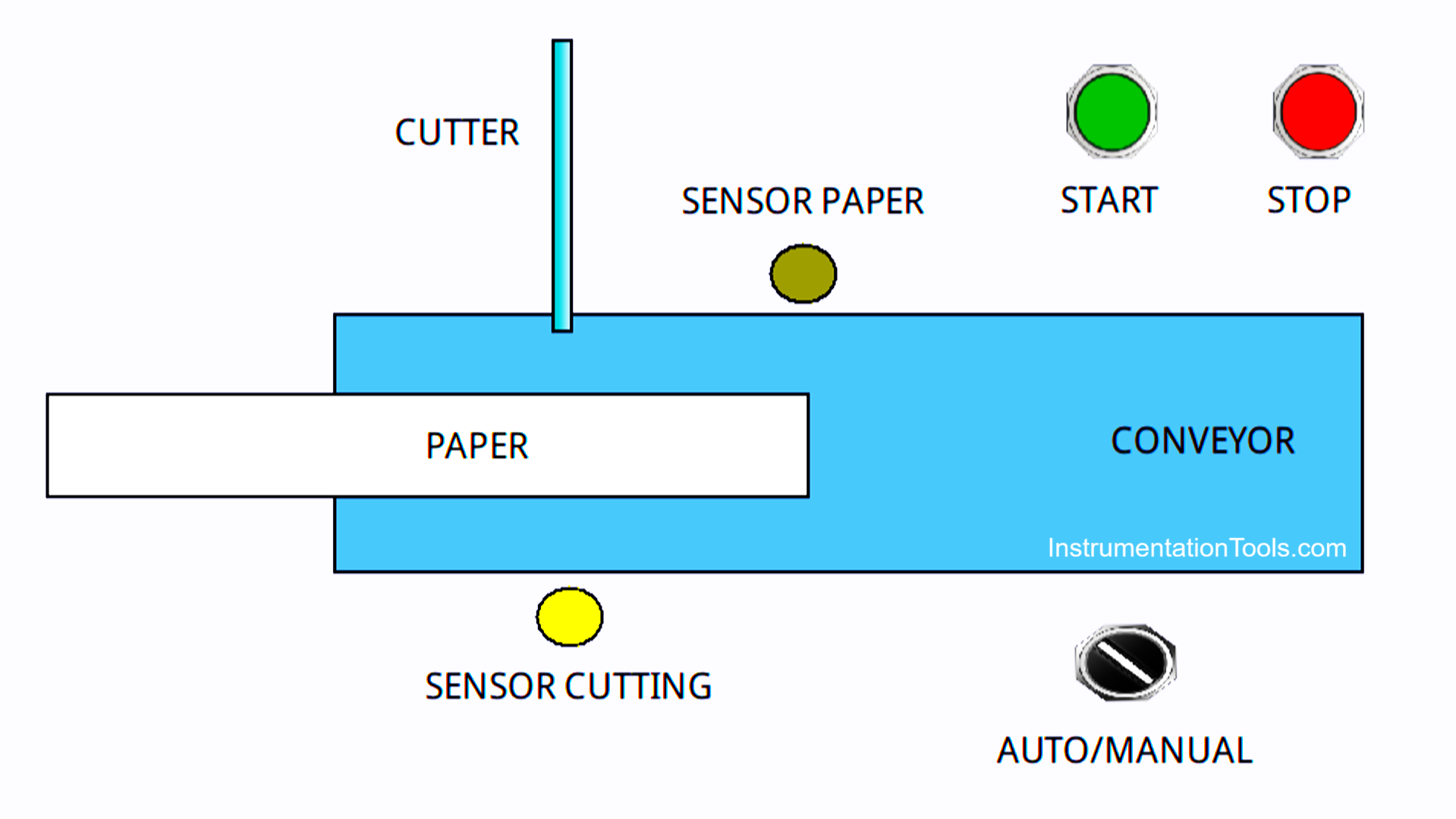
- Select Mode: Choose between Manual and Automatic mode.
- Set Parameters: If you select Automatic mode, set the Set Value Counter parameter (the desired number of pieces).
Cutting Process:
- Start Process: Press the Start button.
- Paper Transport: The conveyor motor will move the paper to the cutting area.
- Paper Detection: The Paper Sensor detects the presence of paper.
- Time Measurement: The system starts counting time-based on the Timer value that has been set for 2 seconds.
- Cutting: After the specified time is reached, the Cutter Motor will activate to cut the paper.
- Cutting Confirmation: The Cutter position sensor detects the end of the cutting process.
- Stop Motor: Conveyor Motor and Cutter Motor will stop.
- Repeat Process (if Automatic): If Automatic mode is active and the number of pieces has not reached the Set Value Counter, the process will be repeated from step 4.
Termination:
Stop Process: The process will stop if:
- The number of pieces of paper has reached the Set Value Counter (Auto mode).
- The stop button is pressed.
PLC Program for Paper Cutting by Length and Count
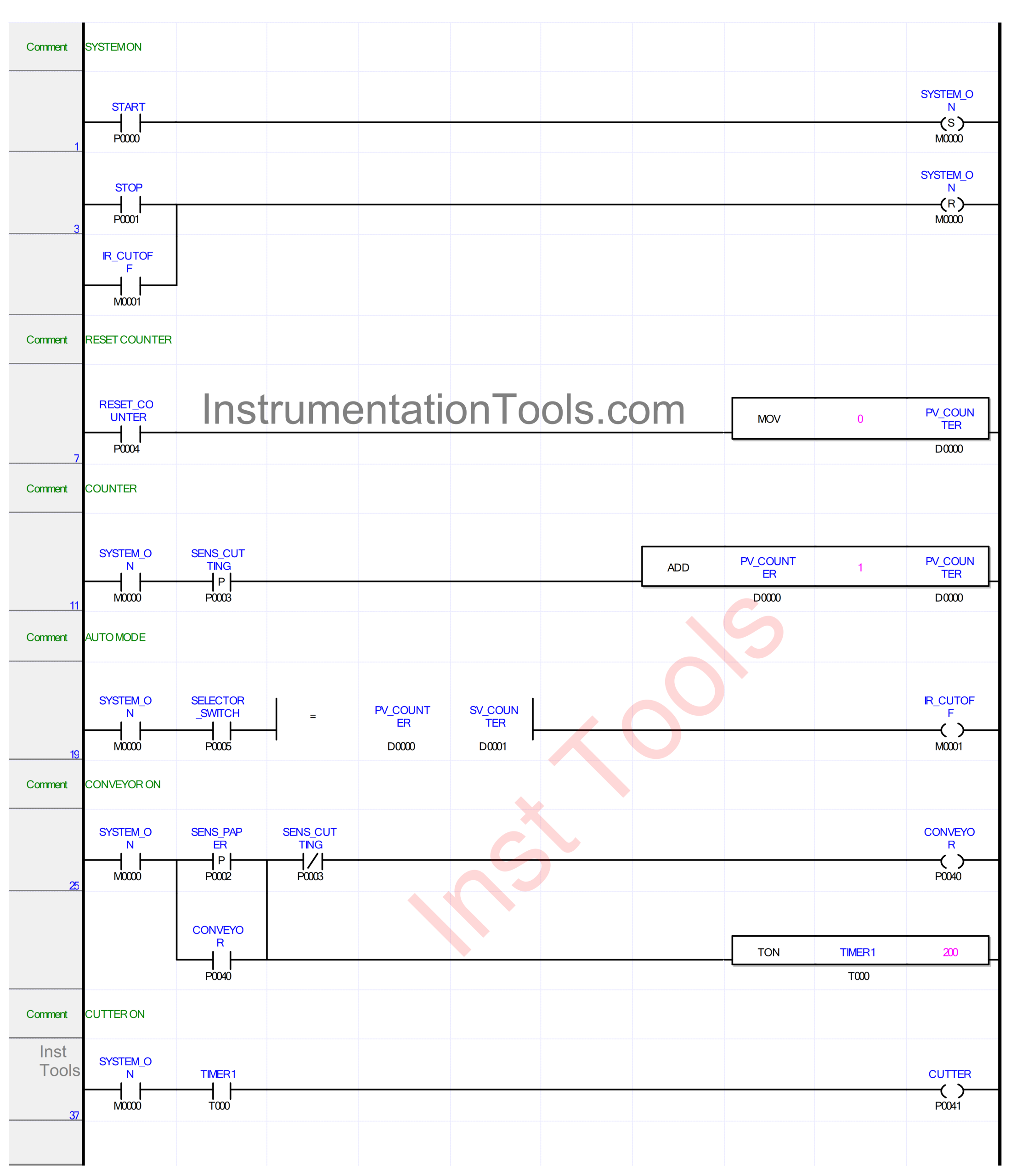
IO Mapping
| S.No. | Comment | Input (I) | Output (Q) | Memory Bits | Memory Word | Timer |
|---|---|---|---|---|---|---|
| 1 | START | P0000 | ||||
| 2 | STOP | P0001 | ||||
| 3 | SENS_PAPER | P0002 | ||||
| 4 | SENS_CUTTING | P0003 | ||||
| 5 | RESET_COUNTER | P0004 | ||||
| 6 | SELECTOR_SWITCH | P0005 | ||||
| 7 | CONVEYOR | P0040 | ||||
| 8 | CUTTER | P0041 | ||||
| 9 | PV_COUNTER | D0000 | ||||
| 10 | SV_COUNTER | D0001 | ||||
| 11 | TIMER1 | T000 | ||||
| 12 | SYSTEM_ON | M0000 | ||||
| 13 | IR_CUTOFF | M0001 |
XG5000 PLC Programming
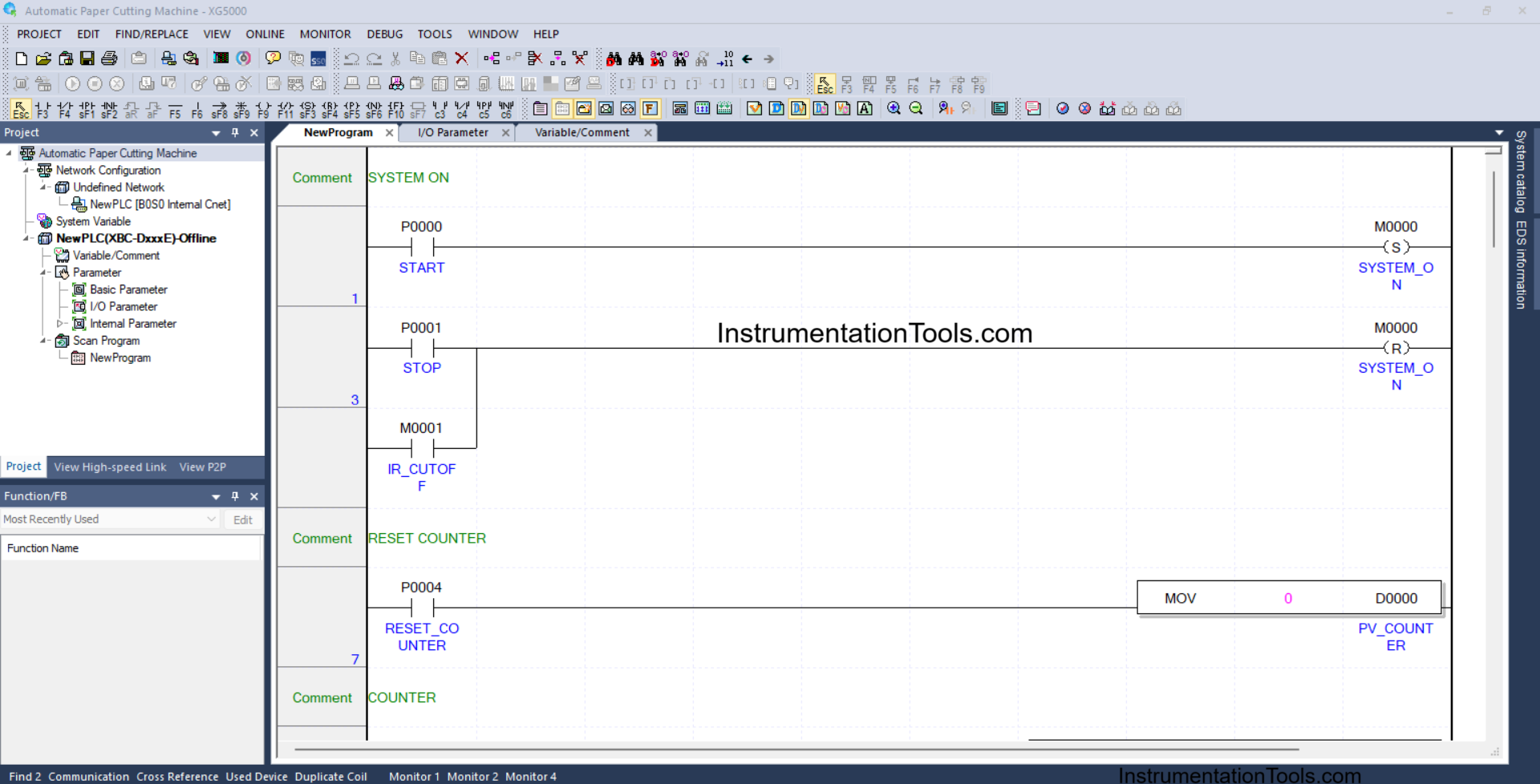
RUNG 1 (SYSTEM ON)
In this Rung, the memory bit SYSTEM_ON (M0000) will be in the HIGH state if the START (P0000) button is pressed. Because it uses the SET Coil Instruction, the memory bit SYSTEM_ON (M0000) will remain in the HIGH state even though the START (P0000) button has been released.
RUNG 3
In this Rung, the memory bit SYSTEM_ON (M0000) will be in the LOW state if the STOP (P0001) button is pressed or the NO contact of the memory bit IR_CUTOFF (M0001) is in the HIGH state.
RUNG 7 (RESET COUNTER)
In this Rung, because the MOV instruction is used, the value in the memory word PV_COUNTER (D0000) will be reset to zero “0” when the RESET_COUNTER (P0004) button is pressed.
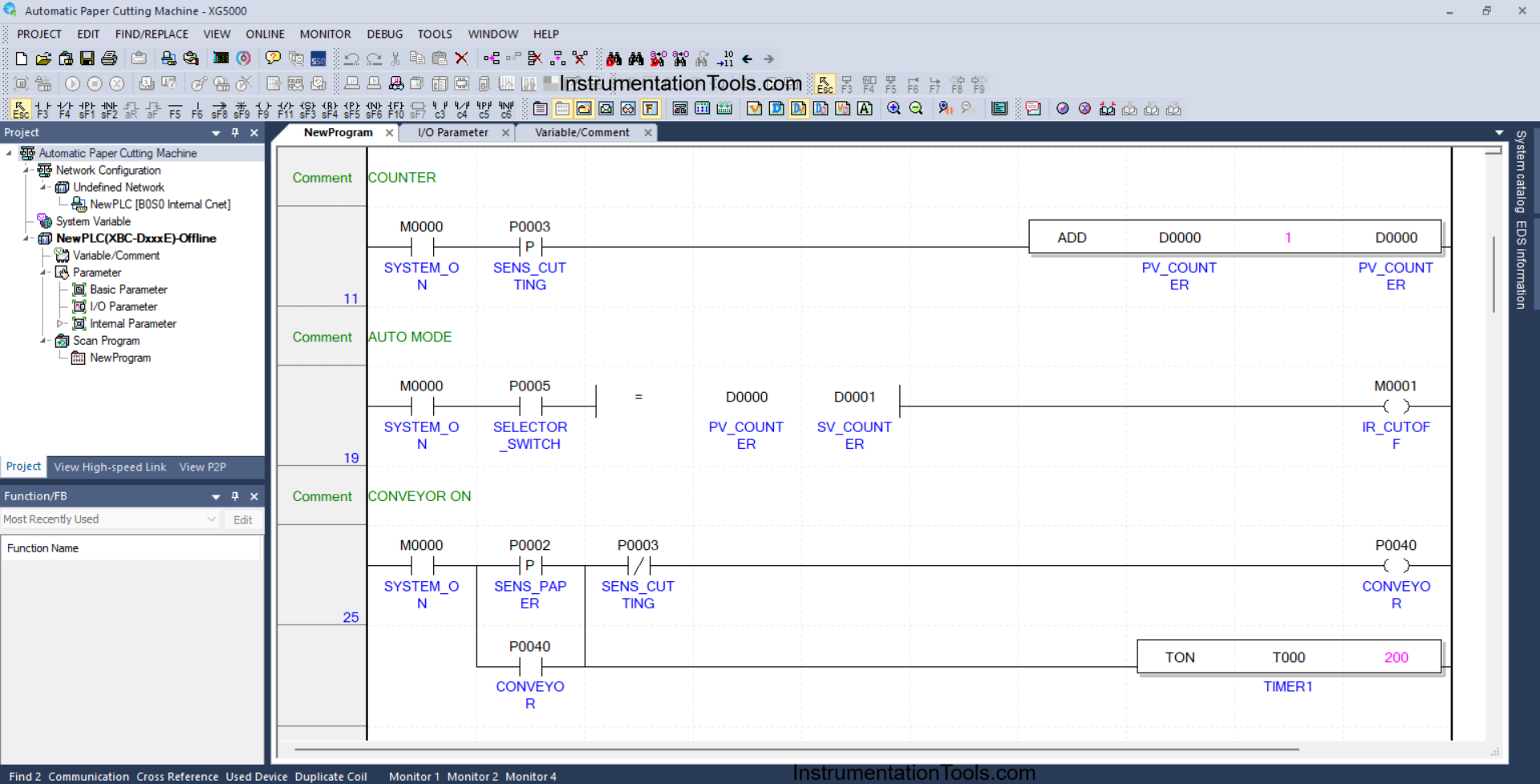
RUNG 11 (COUNTER)
In this Rung, because it uses the ADD Instruction, the value in the memory word PV_COUNTER (D0000) will increase (+1) if the NO contact of the memory bit SYSTEM_ON (M0000) and the sensor SENS_CUTTING (P0003) are in the HIGH state.
RUNG 19 (AUTO MODE)
In this Rung, the memory bit IR_CUTOFF (M0001) will be in the HIGH state if the NO contact of the memory bit SYSTEM_ON (M0000) and the Selector Switch is in the HIGH state, and the value in memory word PV_COUNTER (D0000) is Equal To SV_COUNTER (D0001).
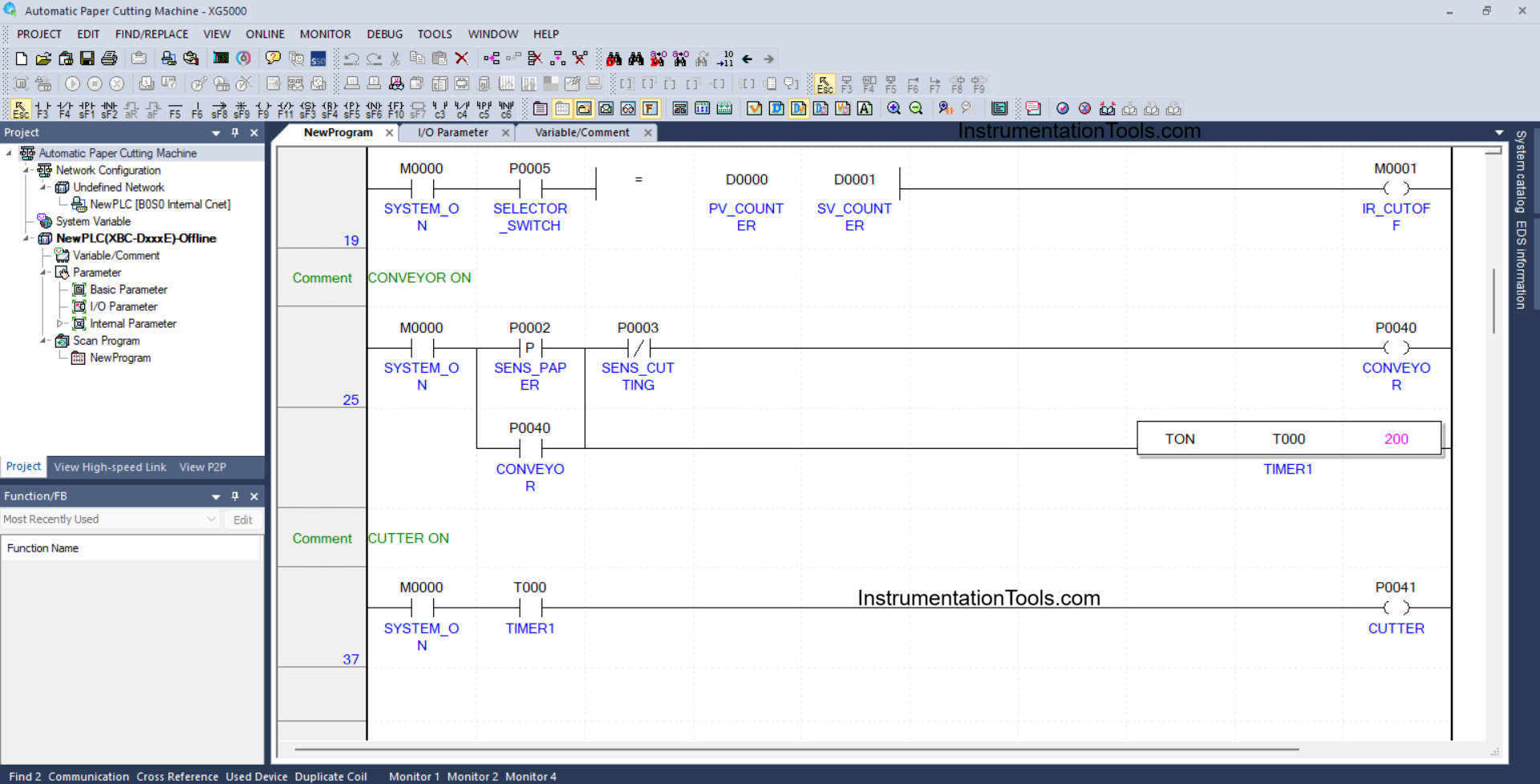
RUNG 25 (CONVEYOR ON)
In this Rung, the output CONVEYOR (P0040) will be ON if the NO contact of the memory bit SYSTEM_ON (M0000) and the sensor SENS_PAPER (P0002) are in the HIGH state. Timer TIMER1 (T000) will start counting up to 2 seconds.
The output CONVEYOR (P0040) will be OFF, and the Timer TIMER1 (T000) will be reset if the NC contact of the sensor SENS_CUTTING (P0003) is in the HIGH state.
RUNG 37 (CUTTER ON)
In this Rung, the output CUTTER (P0041) will be ON when the NO contact of the memory bit SYSTEM_ON (M0000) and the timer TIMER1 (T000) are in the HIGH state.
Read Next:
- PLC Program for Liquid Filling Machine using XG5000
- PLC Programming for Storage and Supply Tank System
- Create a Tank Fill and Drain Program in Siemens TIA-Portal
- Turn ON Lamps Alternately for Set Cycles in PLC Program
- PLC Program for Gas Level Monitoring and Alarming