This article discusses a 2 conveyor packaging process example using the Siemens TIA portal. The system consists of two conveyors: the upper conveyor, which drops products into boxes, and the lower conveyor, which automatically moves the boxes. The PLC system operates based on box detection; products are only dropped when a box is in the correct position. The system keeps count of the number of boxes that have been filled with products.
Program Objective
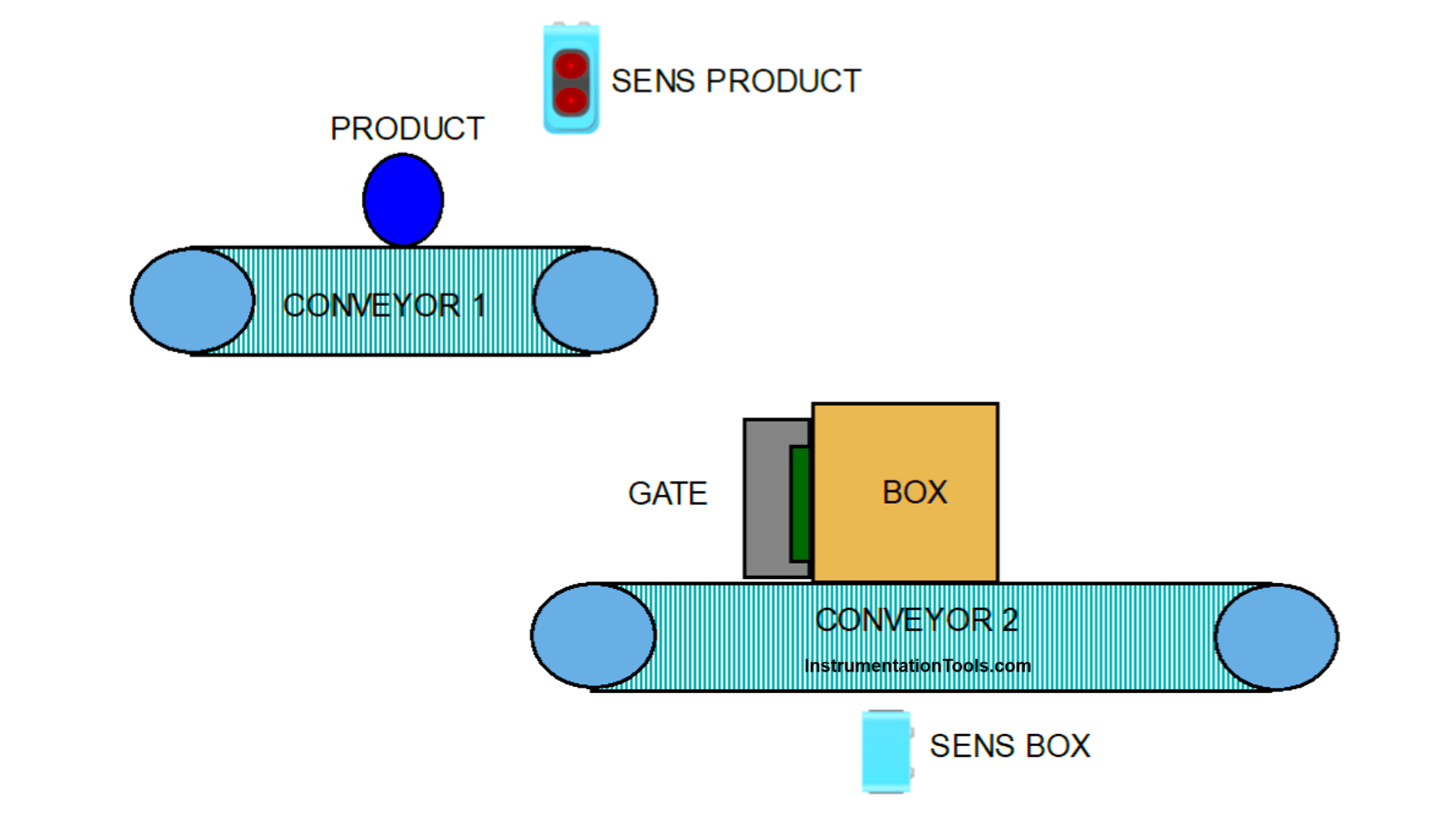
Automated Packaging System Operation Process:
1. Product Distribution
- Conveyor 1 (upper) transports and drops products into boxes
- Conveyor 2 (lower) with retaining gate controls box movement
2. Box Filling Process
- Boxes collect products from Conveyor 1
- Conveyor 2 continues moving boxes forward
3. Full Box Release
When the box reaches capacity:
- Conveyor 1 stops
- Retaining gate opens
- Box proceeds down the line
4. New Box Preparation
The gate automatically closes when sensors detect a new box in the loading position
5. Continuous Cycle
- Conveyor 1 reactivates to fill the next box
- Process repeats automatically.
IO Mapping
| S.No. | Comment | Input (I) | Output (Q) | Memory Bit | Memory Word |
|---|---|---|---|---|---|
| 1 | START | I0.0 | |||
| 2 | STOP | I0.1 | |||
| 3 | SENS_BOX | I0.2 | |||
| 4 | SENS_PRODUCT | I0.3 | |||
| 5 | CONVEYOR_PRODUCT | Q0.0 | |||
| 6 | CONVEYOR_BOX | Q0.1 | |||
| 7 | GATE_BOX | Q0.2 | |||
| 8 | COUNTER PRODUCT | MW0 | |||
| 9 | COUNTER BOX | MW2 | |||
| 10 | SYSTEM_ON | M4.0 | |||
| 11 | ILC_PRODUCT | M4.1 | |||
| 12 | TEMP_SENS_BOX1 | M4.2 | |||
| 13 | TEMP_SENS_BOX2 | M4.3 | |||
| 14 | TEMP_SENS_PRODUCT | M4.4 |
2 Conveyor Packaging Process
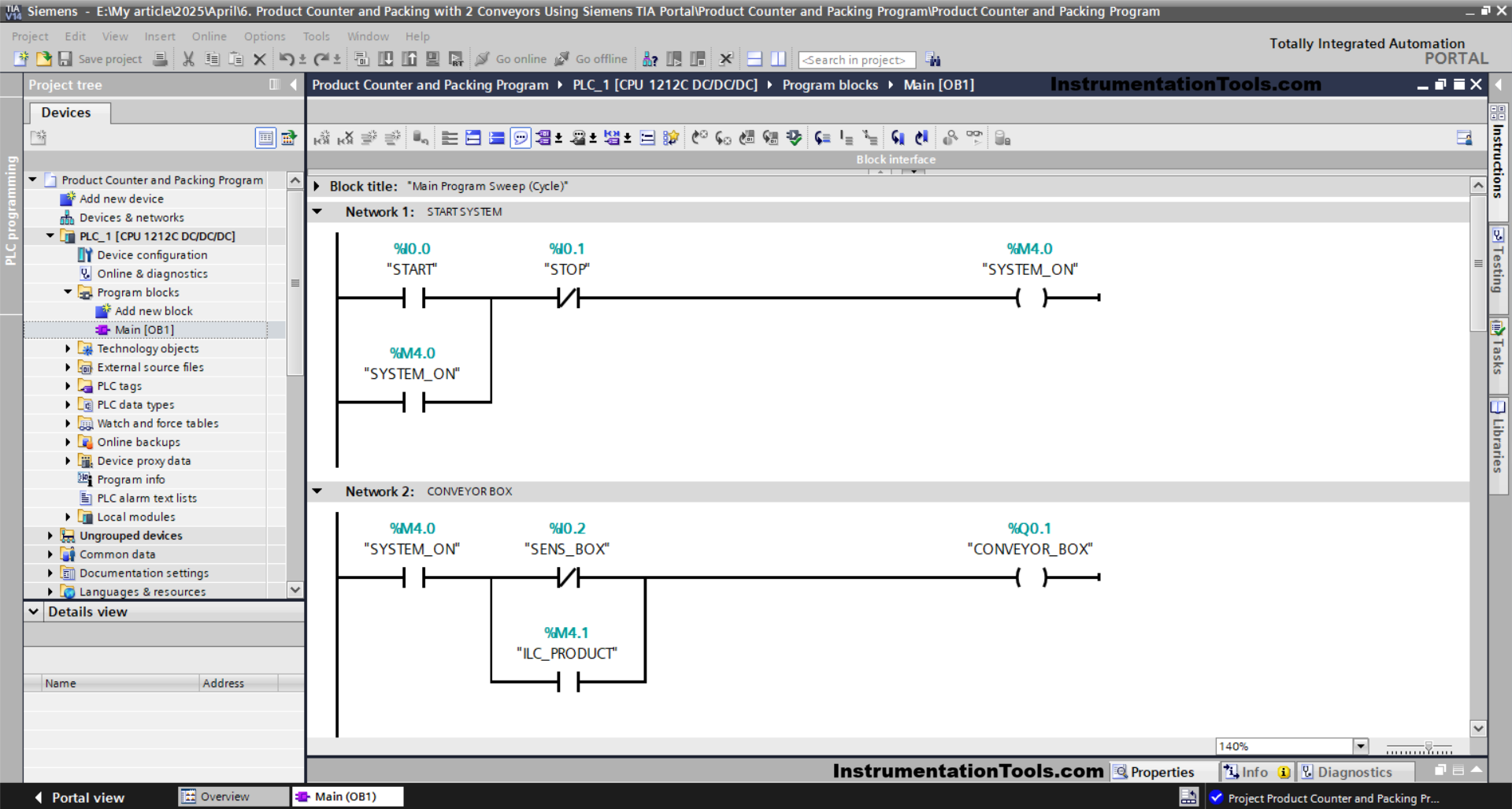
NETWORK 1 (START SYSTEM)
In this Network, the memory bit SYSTEM_ON (M4.0) will be set to a HIGH state if the START (I0.0) button is pressed. The memory bit SYSTEM_ON (M4.0) will remain in a HIGH state even after the START (I0.0) button is released. Because it uses latching.
When the STOP (I0.1) button is pressed, then the memory bit SYSTEM_ON (M4.0) will return to a LOW state.
NETWORK 2 (CONVEYOR BOX)
In this Network, the output CONVEYOR_BOX (Q0.1) will turn ON if the NO contact of the memory bit SYSTEM_ON (M4.0) is in a HIGH state and the NC contact of the SENS_BOX (I0.2) sensor is also in a LOW state.
Or, the CONVEYOR_BOX (Q0.1) output will turn ON if the NO contacts of the memory bits SYSTEM_ON (M4.0) and ILC_PRODUCT (M4.1) are in a HIGH state.
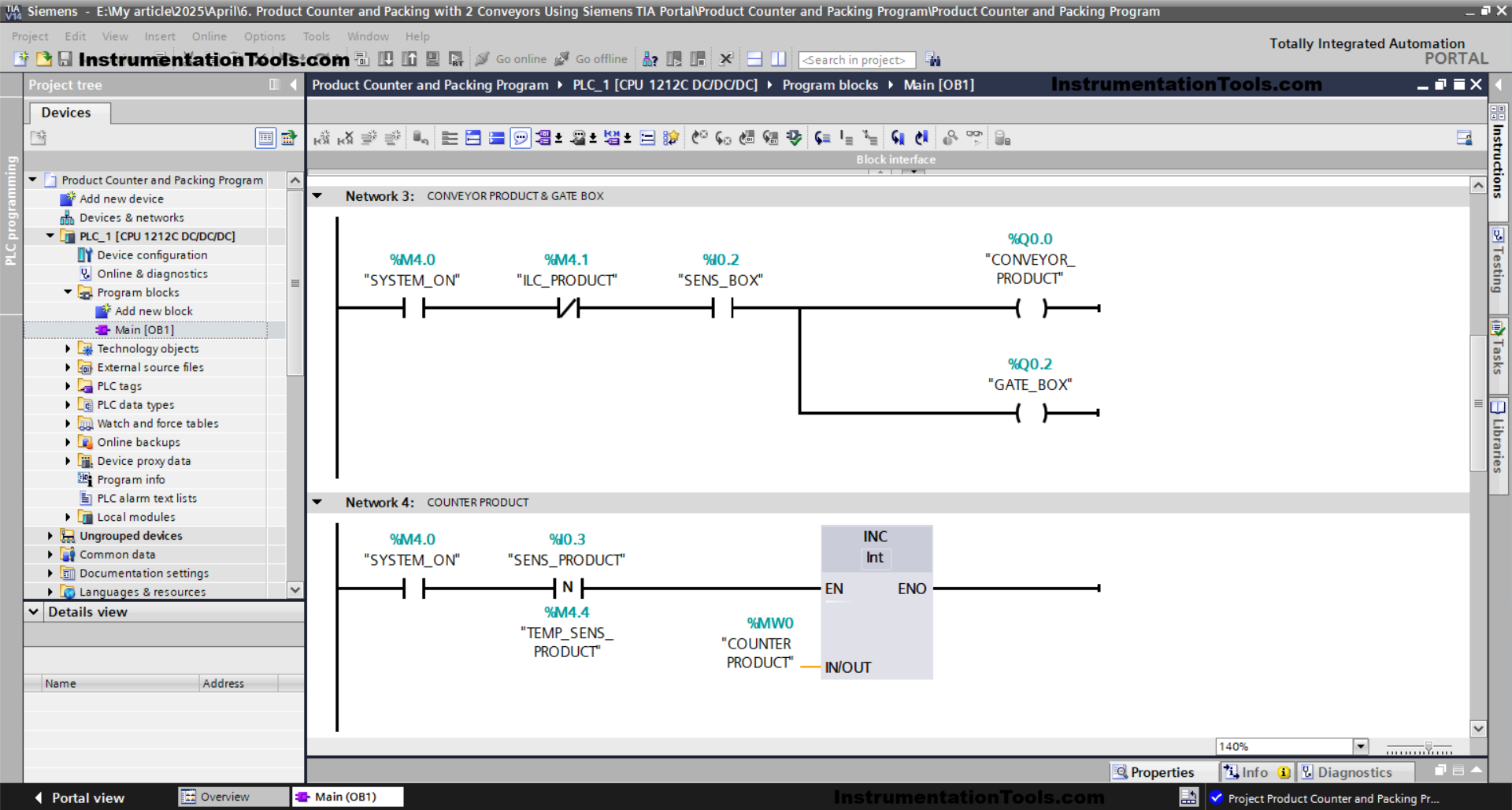
NETWORK 3 (CONVEYOR PRODUCT & GATE BOX)
The CONVEYOR_PRODUCT (Q0.0) and GATE_BOX (Q0.2) outputs will turn ON if the NO contacts of the memory bit SYSTEM_ON (M4.0) and the SENS_BOX (I0.2) sensor are in a HIGH state.
And, the CONVEYOR_PRODUCT (Q0.0) and GATE_BOX (Q0.2) outputs will turn OFF if the NC contact of the memory bit SYSTEM_ON (M4.0) is in a HIGH state.
NETWORK 4 (PRODUCT COUNTER)
In this Network, because the memory word COUNTER_PRODUCT (MW0) uses an Increment instruction, the value in the memory word COUNTER_PRODUCT (MW0) will increase (+1) if the NO contact of the memory bit SYSTEM_ON (M4.0) and the sensor SENS_PRODUCT (I0.3) are in a HIGH state.
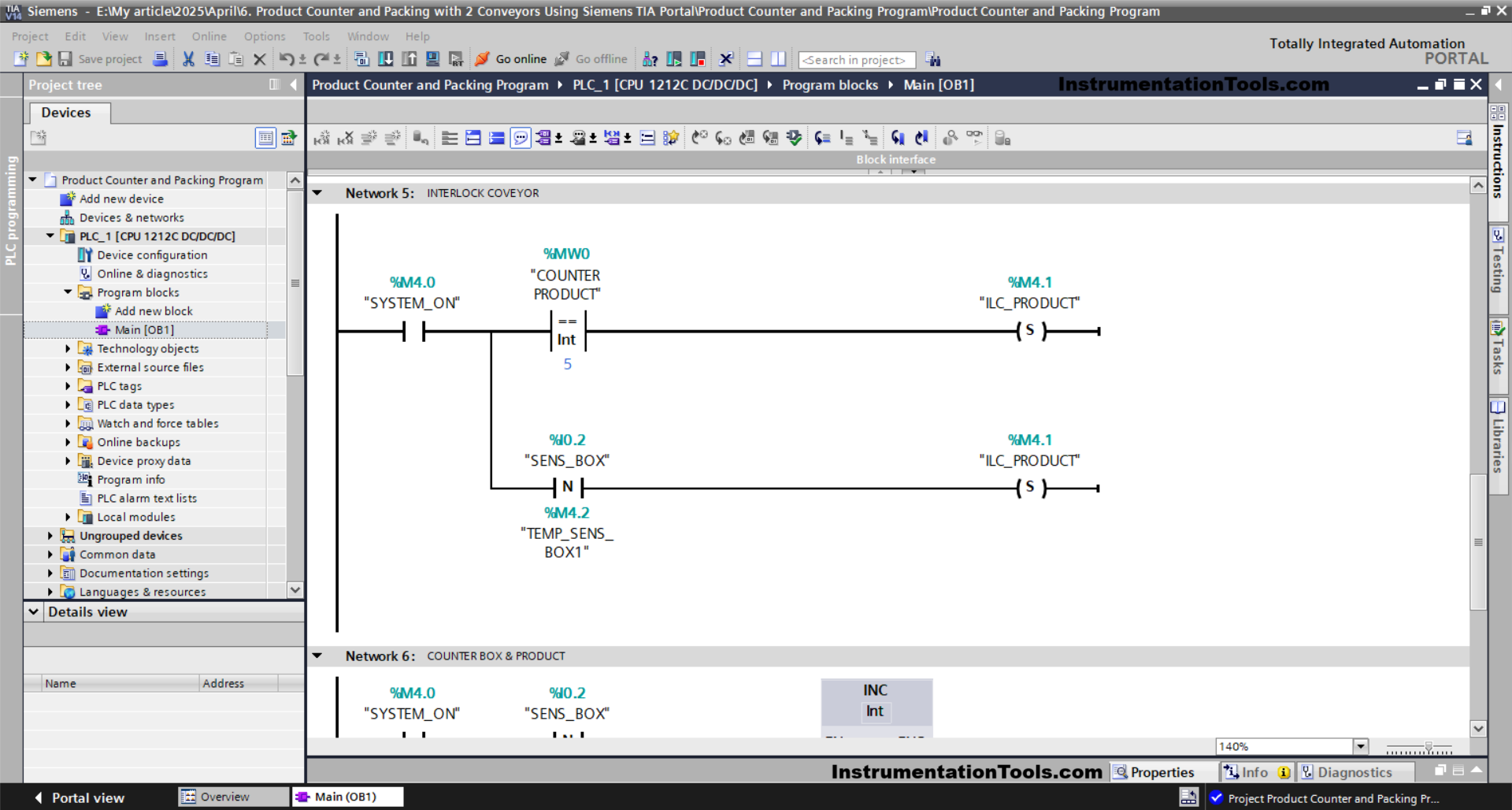
NETWORK 5 (CONVEYOR INTERLOCK)
The memory bit ILC_PRODUCT (M4.1) will turn to a HIGH state when the NO contact from the memory bit SYSTEM_ON (M4.0) is in a HIGH state and the value of the memory word COUNTER_PRODUCT (MW0) is Equal to “8”.
And, the memory bit ILC_PRODUCT (M4.1) will change to a LOW state when the NO contact of the sensor SENS_BOX (I0.2) is in a HIGH state.
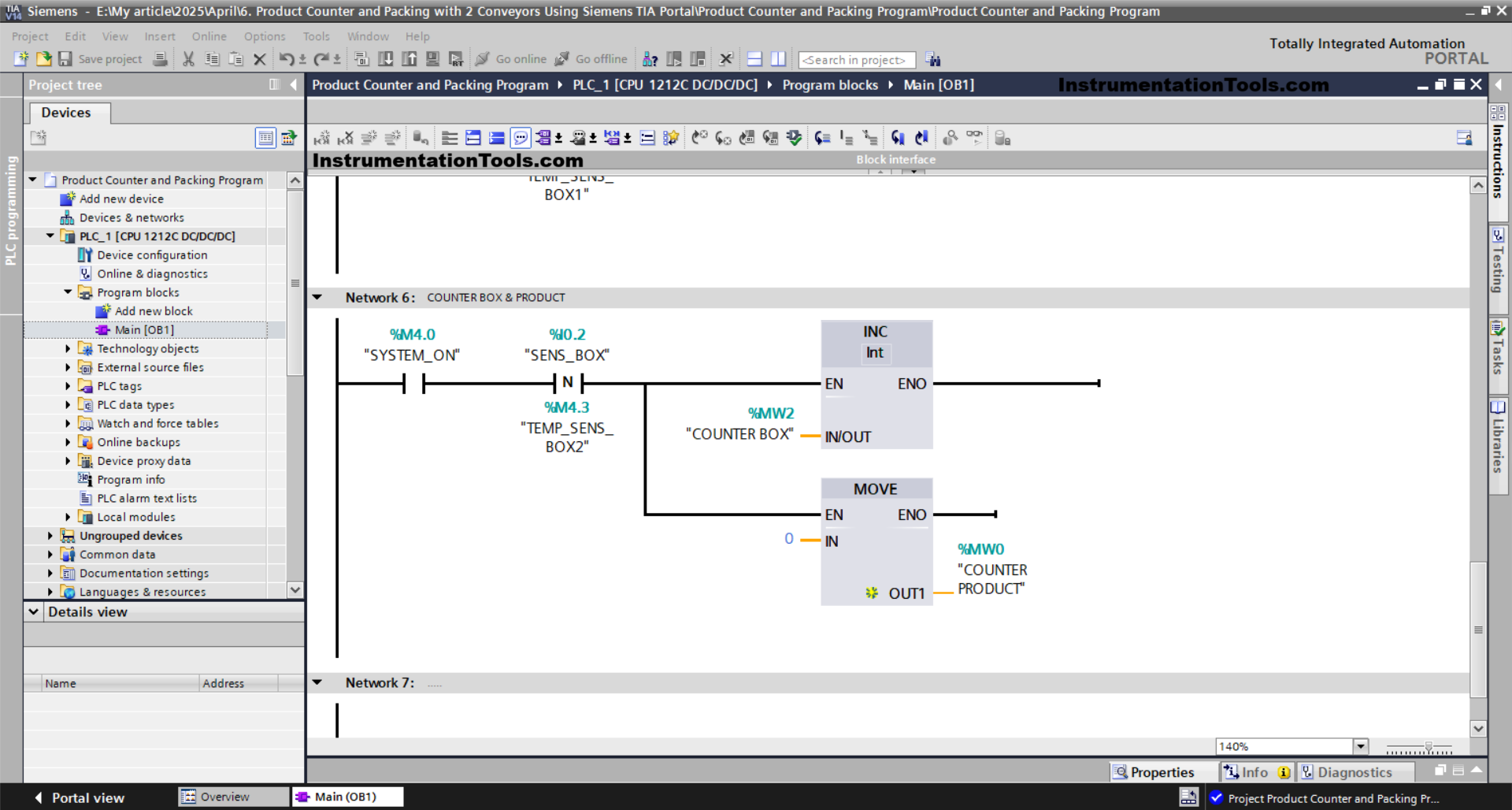
NETWORK 6 (COUNTER BOX & PRODUCT)
The value in the memory word COUNTER PRODUCT (MW0) will be reset to zero “0” When the NO contact of the memory bit SYSTEM_ON (M4.0) and the sensor SENS_BOX (I0.2) are in a HIGH state.
And, because the memory word COUNTER BOX (D2) uses an Increment instruction, then the value in the memory word COUNTER BOX (D2) will increase (+1).
Read Next:
- Does Neutral Wire Give Electric Shock? Tutorials
- Network Issues in Industrial Plants Using CCNA Tools
- PLC Programming for Fruit Sorting by Weight and Color
- Importance of ISA CAP and CCST Certification in Jobs
- Free Download Mitsubishi HMI Software: GT Designer