Two-factor authentication (2FA) for remote PLC programming is increasingly important because engineering access can directly affect safety, production, and compliance. Remote programming typically allows program upload/download, forcing I/O and tags, and modifying any logic changes. A single stolen password can cause regulatory non-compliance, safety incidents, and process shutdowns with hazardous and unwanted effects.
To address this issue of a single password, two-factor authentication (2FA) is a security method used nowadays where a user must prove their identity using two different types of evidence instead of just a password. In this post, we will see the concept of two-factor authentication for remote PLC programming.
What is two-factor authentication?
Two-factor authentication (2FA) is a security method where a user must prove their identity using two different types of evidence instead of just a password. It must be mostly seen by you in banking transactions, where instead of just an ATM pin, an OTP is received in the mobile for the final way. This is done to ensure that if the ATM pin is stolen or misplaced by someone in any way, then at least you have a mobile OTP to safeguard the transaction and prevent it from happening.
A password alone is not enough, because it can be stolen, guessed, shared, or phished. 2FA ensures that even if a password is compromised, access is blocked. Physical possession or biometric is also required. Two-factor authentication is a login method that requires two different types of proof—typically a password plus a physical or biometric factor—to verify a user’s identity.
2-factor authentication (2FA) in PLC / SCADA systems and VPN-based remote engineering access
Remote PLC and SCADA programming is widely used today to reduce unnecessary site visits, minimize downtime, and lower travel and support costs. Engineers can remotely diagnose faults, modify logic, and monitor systems without being physically present at the plant. While this brings significant operational benefits, it also introduces serious cybersecurity risks. If remote access is protected by only a single password and that credential is stolen, shared, or compromised, an unauthorized user can directly impact plant safety, production continuity, and regulatory compliance. This is why two-factor authentication (2FA) is considered essential for secure remote access in modern automation systems.
Two-factor authentication requires two different types of proof to verify a user’s identity—typically something the user knows (username and password) and something the user has (a one-time password, mobile authenticator, or hardware token). A critical point to understand is that PLCs and most SCADA systems do not natively support 2FA. Instead, 2FA is implemented at the remote access layer that controls how engineers reach the industrial network or engineering workstation.
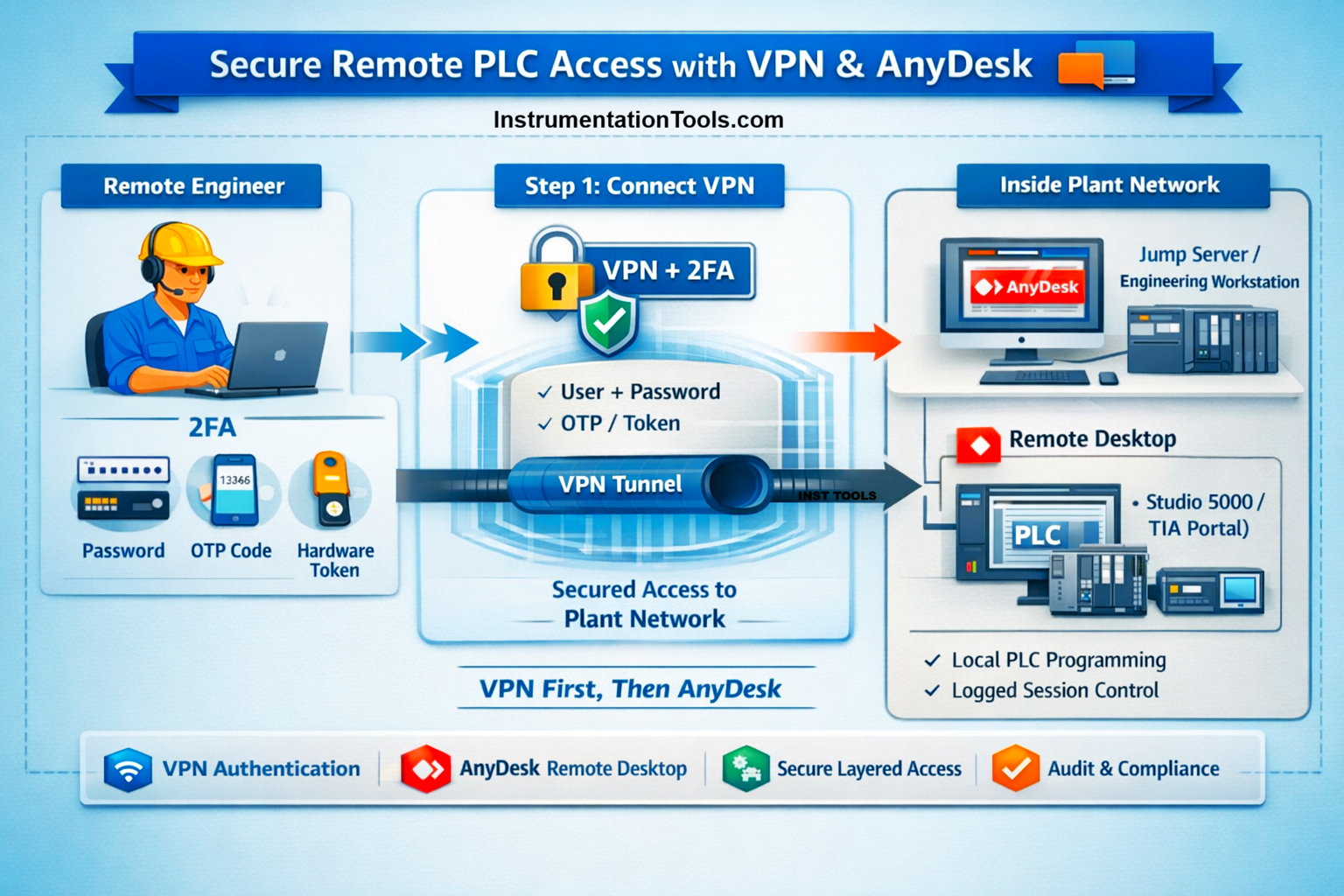
The most common and recommended approach is the use of a VPN with 2FA. In this setup, the engineer opens a VPN client and enters a user ID and password. As the second factor, an OTP is generated by a mobile authenticator application or approved hardware token. Only after successful verification of both factors does the VPN tunnel open. Once connected, the engineer gains controlled network-level access to the automation system and can connect to PLCs, HMIs, or SCADA servers using standard engineering tools. The PLC itself is unaware of the 2FA process; however, the control network ensures that only authenticated users can reach it.
In many modern installations, secure remote access gateway hardware is used instead of traditional VPNs. These devices are installed inside electrical panels and are purpose-built for OT environments. Examples include Ewon Cosy or Flexy, Phoenix Contact mGuard, and Secomea SiteManager. In this architecture, engineers authenticate via a secure cloud portal that enforces strong authentication, often including 2FA. Access is typically time-limited, role-based, and fully logged. A secure, temporary tunnel is created only when needed, eliminating permanent VPN connections and significantly reducing the attack surface. These solutions are widely accepted in regulated industries such as water, wastewater, pharma, and energy.
Remote desktop tools such as AnyDesk and TeamViewer are also commonly used in PLC and SCADA environments, but their role in 2FA is often misunderstood. These tools implement 2FA at the user account level to protect access to the remote desktop session—not to the PLC or the control network. When an engineer logs into AnyDesk or TeamViewer with 2FA, the authentication verifies the user before allowing access to a remote PC, such as an engineering workstation or SCADA server. Once logged in, the engineer operates the system exactly as if physically present at that computer, and the PLC sees a normal local connection. The PLC itself is not protected by 2FA in this case.
Because of this limitation, AnyDesk or TeamViewer alone is generally not sufficient for industrial-grade security. They provide user authentication but do not enforce network segmentation, control which PLCs are reachable, or meet many IEC 62443 requirements on their own. For acceptable security, these tools should be used in combination with VPNs, jump servers, or secure remote access gateways, where 2FA is applied before the engineer reaches the control environment.
In summary, 2FA in automation systems never authenticates directly to the PLC. Instead, it protects the pathways engineers use to reach automation assets—such as VPNs, secure gateways, or remote desktop platforms. The security strength depends on whether 2FA is applied only to a remote PC or to the industrial network itself. Properly implemented, 2FA enables safe remote engineering while preserving safety, reliability, and compliance.
Practical example where an automation system has both VPN and AnyDesk for remote access
In a secure industrial setup where both VPN and AnyDesk are used, the VPN connection is always established first. The engineer starts by opening the VPN client and authenticating using two-factor authentication, typically with a username and password, followed by an OTP or hardware token. Once the VPN tunnel is successfully established, the engineer is securely connected to the plant’s network or industrial DMZ. At this stage, access is controlled at the network level, and only approved internal systems are reachable.
After the VPN connection is active, the engineer then launches AnyDesk to remotely access a designated internal engineering workstation or jump server. AnyDesk may also require its own authentication, and in some cases additional 2FA, before the remote desktop session begins. Once logged in, the engineer operates the internal PC exactly as if physically present at the site. From this internal machine, PLC or SCADA engineering software is opened and used to connect locally to the controllers or servers. The PLC itself sees a normal local engineering connection and remains unaware of the VPN or AnyDesk authentication layers.
This sequence—VPN first, AnyDesk second—ensures that remote access is protected at multiple layers. The VPN with 2FA controls who can enter the plant network, while AnyDesk restricts who can operate the internal engineering workstation. Together, they provide strong security, clear audit trails, and alignment with industrial cybersecurity standards such as IEC 62443