In an industrial automation system, the PLC is the brain that controls the machine, while the HMI is the interface used by operators to give commands. Ideally, the HMI only requests actions, and the PLC safely decides what to do. However, problems arise when both the PLC logic and the HMI try to control the same signal at the same time. This situation is known as a PLC-HMI command collision.
PLC HMI Command Collisions
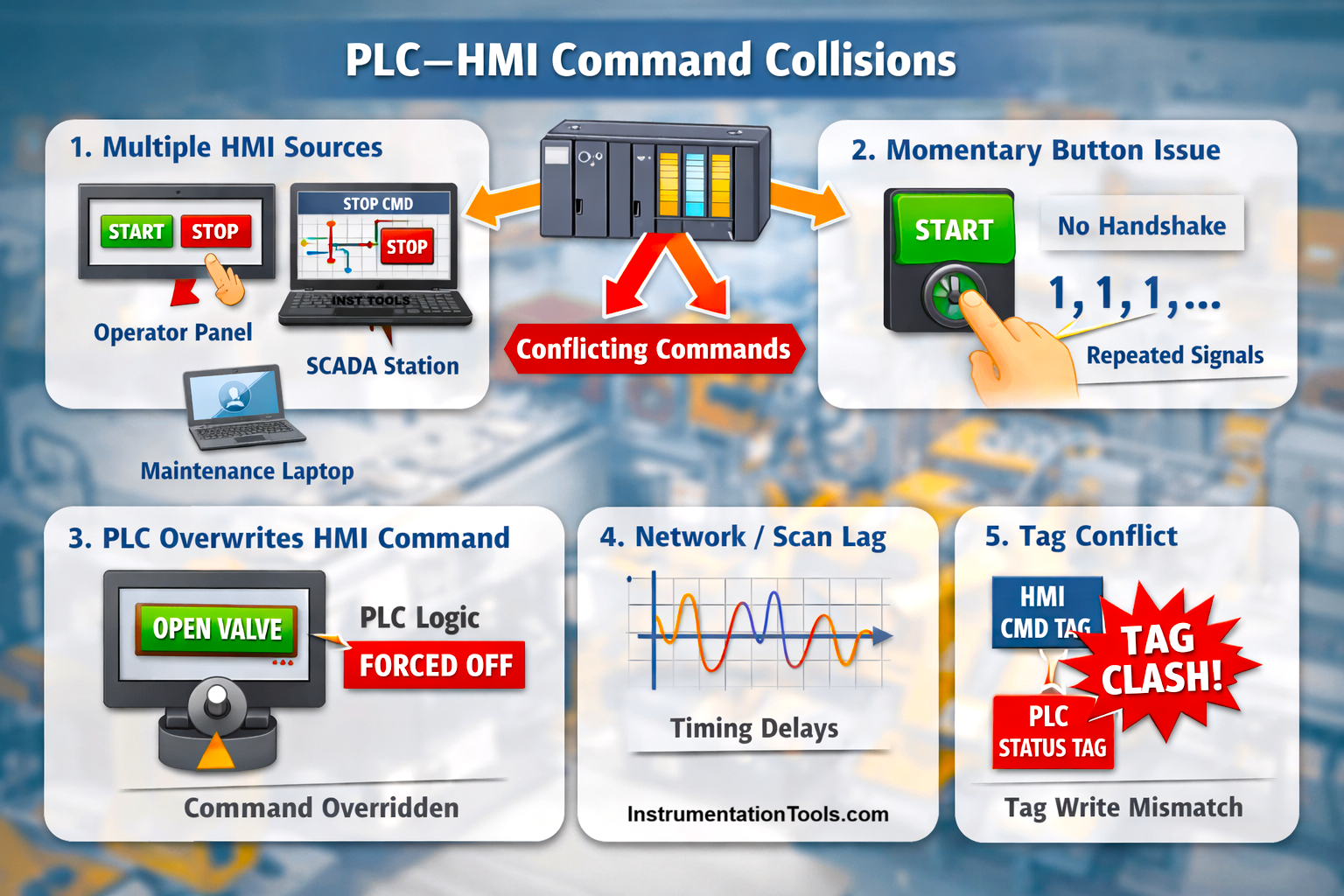
A command collision occurs when multiple sources, such as manual commands from the HMI, automatic sequences in the PLC, or even multiple HMI screens, write to the same tag or output without proper coordination. When this happens, the system may behave unpredictably: motors may start and stop unexpectedly, commands may be ignored, or interlocks may appear to fail even though the logic is correct.
Command collisions are not always obvious during testing and often appear only during real operation, making them difficult to troubleshoot. Understanding and preventing PLC-HMI command collisions is essential for building safe, reliable, and operator-friendly automation systems, which will be seen in this post.
Auto vs. manual control collision
In many industrial machines, equipment such as motors, valves, or pumps can be operated either in auto mode, where the PLC runs a predefined sequence, or in manual mode, where the operator controls the equipment through the HMI. A command collision occurs when both modes are active at the same time and are allowed to write to the same command or output.
For example, an operator presses the start motor button on the HMI while the PLC’s automatic logic determines that a stop condition is required due to a process step, interlock, or sequence transition. During every PLC scan, the manual command attempts to force the motor ON, while the automatic logic forces it OFF. Because the PLC executes this logic repeatedly and very fast, the motor command keeps getting overwritten, resulting in behavior such as the motor failing to start, starting and stopping rapidly, or appearing to ignore the operator command.
This problem is not caused by faulty hardware or incorrect logic, but by poor control of ownership, where auto and manual commands are not properly isolated. The correct design requires a clear mode selection and arbitration logic, ensuring that only one control source – either auto or manual has authority over the equipment at any given time.
Multiple HMI sources writing the same tag
This command collision occurs when more than one HMI source is connected to the same PLC and is allowed to write to the same command tag. In a typical plant, this may include an operator panel on the machine, a SCADA system in the control room, and a maintenance or engineering station connected to the PLC.
When one HMI writes a start command and another HMI writes a stop command to the same tag, the PLC simply processes whichever value arrives last over the communication cycle. To the operator, this appears as unexplained or “ghost” behavior, such as a motor stopping without any visible action on the local panel.
As a result, the controlled device may start only briefly, stop when the operator navigates to another screen, or behave inconsistently depending on which screen is currently open. The PLC logic itself may be correct, but the lack of command ownership and control authority between multiple HMI sources leads to unpredictable operation and makes troubleshooting difficult.
Momentary HMI command without handshake
In PLC-HMI communication, a handshake is a controlled exchange of signals that confirms a command has been received and processed exactly once. Instead of both the HMI and PLC writing to the same command tag, the HMI only sets a command request bit, such as a start request, and the PLC reads this request and internally generates a one-time action. After accepting the command, the PLC sets a separate acknowledgment or status bit to indicate that the request has been received, and then clears the command request itself.
The HMI monitors this acknowledgment and stops sending the command once confirmation is received. This approach prevents repeated triggering, missed commands, and tag ownership conflicts because the HMI never tries to control or reset PLC logic directly. A proper handshake ensures that each operator action is executed once, reliably, regardless of PLC scan time or HMI refresh rate.
This handshake-type PLC-HMI command collision happens when an HMI momentary button writes a command bit that the PLC immediately resets after reading it, without any confirmation or handshake mechanism. When an operator presses a momentary button, the HMI may continue to write a logic “1” to the command tag for as long as the button is pressed, while the PLC logic clears the same tag after consuming the command.
Because the PLC scan time is much faster than the HMI communication refresh rate, the PLC may see the same command multiple times or miss it entirely. This results in symptoms such as repeated starts, unintended retriggering of sequences, or commands that work intermittently. The root cause is shared control of the same command tag by both the HMI and the PLC, instead of using a proper command–acknowledge or one-shot mechanism where the PLC alone owns and processes the command.
Network and scan time-related collision
This type of command collision happens when differences in PLC scan time, HMI refresh rate, or network communication delays cause a command to be missed, repeated, or applied inconsistently.
For example, an HMI may send a start command that remains true for only a short interval, while the PLC scans its logic much faster or slower than the HMI updates. If the PLC reads the command too late or too early, it may miss the signal entirely or detect it multiple times in a single sequence. Similarly, network latency, jitter, or heavy traffic between the HMI and PLC can cause the command to arrive irregularly.
The result is intermittent or unpredictable device behavior, such as motors failing to start on the first attempt, alarms retriggering, or sequences restarting unexpectedly. This collision is avoided by using proper command latching, handshake, or one-shot mechanisms, ensuring that each operator action is captured reliably regardless of scan or refresh timing.